
Contractors and external companies — oversight that starts before anyone enters the site

Collect the contractor's documents, verify their workers' qualifications, deliver the site induction and grant access before anyone passes the gate.

  • Contractor control
  • Trade qualifications
  • Site induction
  • Safety coordination
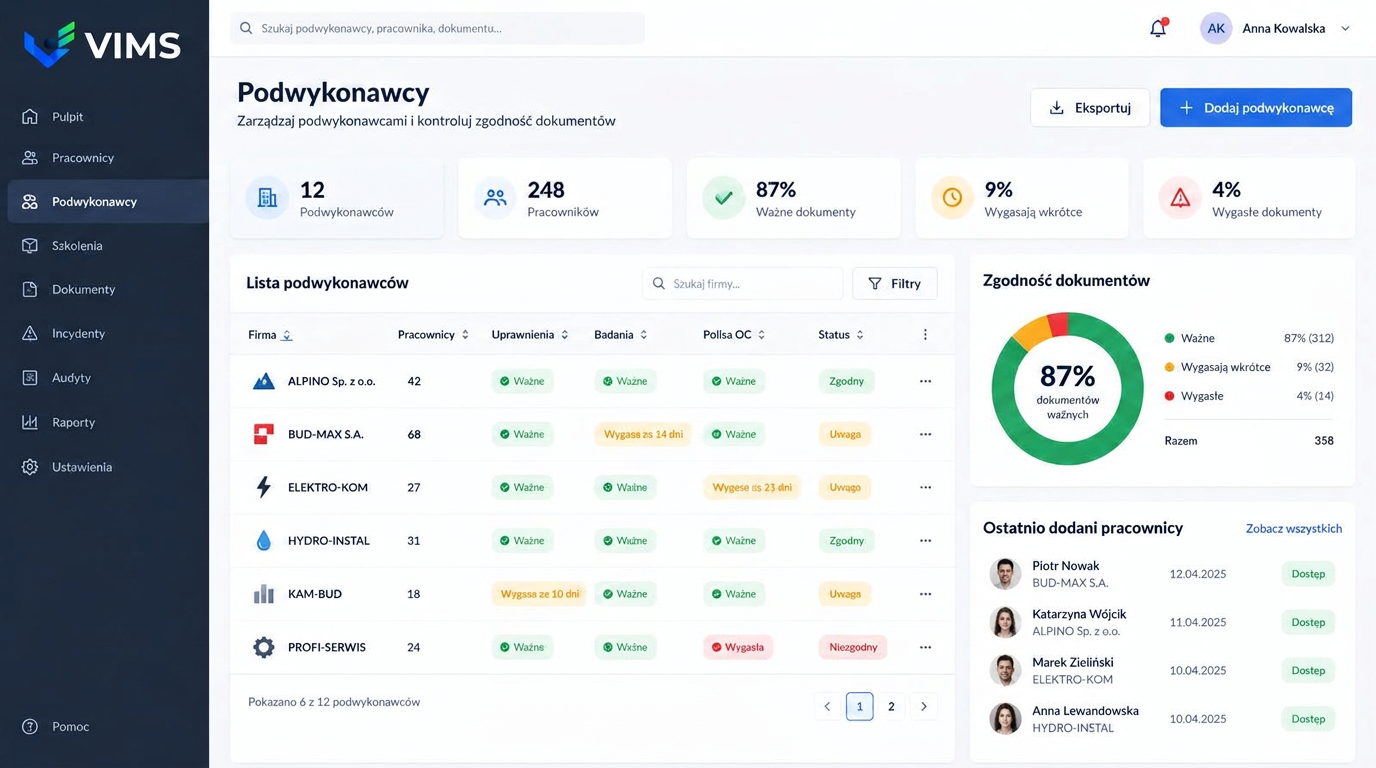
VIMS — contractor management module showing the register of external companies, qualification, medical and insurance status, document compliance and workers with site access

The risk that walks in with the contractor

A large share of serious events in industrial plants involves work carried out by external companies: overhauls, inspections, construction, machine servicing and work at height. The contractor knows their own technology but not the plant — the layout of installations, internal traffic rules, alarm signals or the places that demand extra caution.

At the same time, contractor documentation is often the least organised part of the system. A copy of a qualification in an email, an insurance policy in the project manager's folder, a medical certificate shown once on the first day — and the question of whether everything is still valid in month three goes unanswered.

The contractor module creates one register of companies and their workers, where every required document carries an expiry date and a visible status. Instead of searching mailboxes, the coordinator sees which company is fully compliant, whose documents expire in the coming days and who is missing a certificate.

Qualifying the company and clearing its workers

The process starts with qualifying the company itself: registration data, scope of services, liability insurance, declarations about the site safety rules and the named coordinator on the contractor's side.

The next level is the individual worker. For each one you record the required documents: safety training, medical certificates, electrical and trade authorisations, lifting equipment operator licences, welding qualifications or work-at-height clearances, matched to the scope of the job.

The third element is the site induction. Confirmation that it was delivered is stored with the worker, so during an inspection or after an event it is clear who was briefed, when and on what.

What the Contractor management module gives you

Company and worker register

One list of external companies together with the workers assigned to jobs on site.

Documents with expiry dates

Qualifications, medicals, training and insurance stored against the company or the worker, with a clear validity status.

Expiry warnings

Documents expiring in the coming days are flagged before they block the job.

Induction and access

Site induction and rule acknowledgement recorded against the named individual.

Checks during the job

Field observations assigned to the contractor, with the option to raise a corrective action.

Document compliance

A compliance indicator for the whole site and broken down by individual company.

The contractor path from request to completion

Every stage leaves a trace, so at any moment it is clear who is working on site and on what basis.

  1. 1Company and scope registered
  2. 2Company documents verified
  3. 3Workers cleared
  4. 4Induction and access granted
  5. 5Supervision and field checks
  6. 6Job closed and contractor evaluated

Oversight during the job, not only at the gate

Checking documents on entry is necessary but not sufficient. Work lasting weeks or months needs ongoing supervision: walkarounds, observation of working methods, verification that protective equipment is used and a response to deviations.

In VIMS remarks from such checks are recorded against the contractor rather than in a separate notebook. Repeated deviations become visible as company history, giving a solid basis for a conversation with their management and for decisions about future cooperation.

Where a remark requires fixing, a corrective action is created with an owner and a deadline. If an event involves a contractor, the event record links to the company, its documents and earlier observations.

Evaluating the contractor after the job

Once the job is complete it pays to record an evaluation: timeliness, quality of workmanship, how safely the work was run, the number of remarks and events. That evaluation is invaluable at the next tender, when offers have to be compared.

A cooperation history kept in one place also supports decisions in front of management and auditors. Instead of impressions there is a set of facts: how many jobs the company delivered, how many issues were raised and how quickly they were resolved.

Plants that keep this record consistently usually see a change on the contractor side within months. Knowing that documents and field behaviour are logged raises the level of preparation by itself.

Frequently asked questions about contractor management

Will the system remind us about expiring contractor documents?

Yes. Documents carry expiry dates and the module shows valid, expiring and expired items, flagging them to the works coordinator.

Can we track individual workers of a company?

Yes. Beyond company documents you register specific workers with their training, medicals and qualifications.

Can different work types require different documents?

Yes. The required document set is configured separately, for example differently for machine servicing than for construction or work at height.

Does the module connect to permits to work?

Yes. The contractor named on a permit comes from the company register, so their document status is visible at authorisation.

Can we evaluate a contractor after the job?

Yes. The evaluation, together with the number of remarks and events, stays in the company history and is available at the next job.

Related modules

Permit to work

No more paper permits travelling around the site in search of a signature. The application, task risk assessment, approvals and working conditions run in one workflow visible to everyone involved.

Permit to work

VIMS module

See in one view who holds valid training and qualifications, whose certificates expire soon and what is missing for a given job.

Training and qualifications

VIMS module

Plan an audit or round, run it from a phone, record nonconformities and launch actions immediately — without retyping results into a spreadsheet.

Audits and inspections

Bring contractor oversight into one place

Book a demo and see how a contractor is cleared for work at your own site.