
VariloVIMS

VIMS for construction — supervising work that changes every day

On a construction site the crew, the scope and the hazard map change faster than any document. A site manager rarely needs another study — they need to know who is on site today, which work is permitted, and whether the crew heading to the roof holds valid qualifications. VIMS turns that into a daily view rather than an archive.

  • Permit to work
  • LMRA
  • Subcontractors
  • Qualifications
  • Field inspections
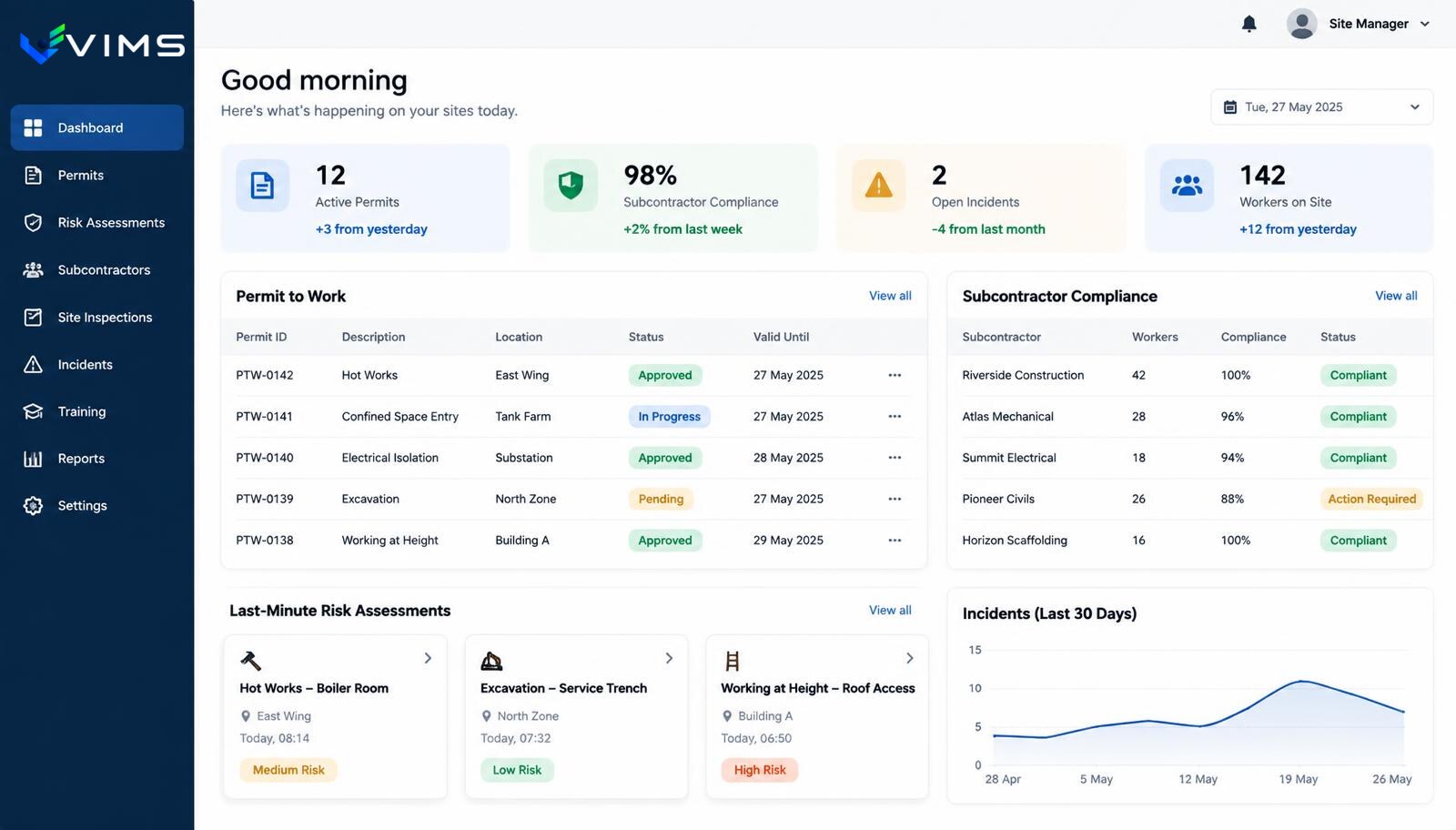
V-IMS — construction dashboard: active permit-to-work list with statuses, subcontractor compliance table, last-minute risk assessment cards and an incident chart

A paper permit has one flaw: it lives in the site office

A permit for high-risk work only matters if it is available at the moment a decision is made. In practice the original sits in the site office while the supervisor in the field works from memory and a phone.

The consequence is the absence of an overall picture. Nobody can say offhand how many hot works are running simultaneously, or whether any of them border a zone where cutting is about to start. Clashes appear only in a review afterwards.

The second problem is subcontractor turnover. A crew appears for three days, completes a scope and leaves. Documents are verified on the first entry and often not on the next, because 'they were here before'.

Authorisation as a process, not a signature

VIMS treats authorisation as a sequence: a request describing scope and location, required safety conditions, confirmation of crew qualifications, approval, and closure once work ends. Each step has an author and a timestamp.

For a site manager that means one view of active permits with location and validity. For client-side supervision it means checking the state without calling anyone.

LMRA — a short risk check immediately before work starts — completes the picture from the other side. The permit describes planned conditions; the LMRA describes actual ones, and the gap between them is often where incidents begin.

Features that hold up on site

Electronic permits to work

Hot work, confined space, work at height and excavation, with conditions, approvals and validity periods.

LMRA before starting

A short assessment of actual conditions carried out by the crew on the spot, with the option to stop work.

Subcontractor records

Company and personal documents with expiry dates — a missing valid document is visible before site entry.

Qualifications and training

Verification of qualifications tied to specific work types, not just a general induction.

Field inspections

Walks with a checklist and photos, creating an immediate instruction to remove the nonconformity.

Incidents and stop-work

A register of incidents, near misses and stop-work decisions together with their justification.

Work authorisation flow on site

From request to permit closure, with every decision recorded.

  1. 1Permit request
  2. 2Crew verification
  3. 3Safety conditions
  4. 4Approval
  5. 5LMRA on the spot
  6. 6Supervision during work
  7. 7Permit closure
  8. 8Lessons and actions

Modules used in this industry

The starting set follows the processes that generate the most work and the most risk in this environment.

Permit to work

No more paper permits travelling around the site in search of a signature. The application, task risk assessment, approvals and working conditions run in one workflow visible to everyone involved.

Explore the module

LMRA

A job risk assessment describes a workplace under typical conditions. LMRA answers a different question: is this work safe here, right now, with this crew?

Explore the module

Contractor management

Collect the contractor's documents, verify their workers' qualifications, deliver the site induction and grant access before anyone passes the gate.

Explore the module

VIMS module

See in one view who holds valid training and qualifications, whose certificates expire soon and what is missing for a given job.

Explore the module

Rounds and inspections

A safety walkaround is a cheap prevention tool, but only when it happens regularly and ends with an assigned task. This module enforces both conditions.

Explore the module

VIMS module

Report an event in seconds, run the root cause analysis, plan actions and close the case with complete documentation in one place.

Explore the module

VIMS module

No more action lists in a spreadsheet. Every action has an owner, a deadline, a status and an effectiveness check — all in one view.

Explore the module

Safety conversations

Few workers fill in a form to say that a guard gets in the way or that a procedure is unrealistic at the current pace. They will say it in a short conversation at the machine. This module structures those conversations and turns them into usable knowledge.

Explore the module

Who is on site today, and on what basis

Attendance looks like a simple question until it has to be answered during an inspection. The crew leader's list, the gate log and the training register are usually three sources that need not agree.

Linking the people register to the company register and document status gives one answer from one data set. It shows not only who is present but whether their qualifications were valid on the day the work was done.

The same data matters after an incident. Establishing who took part and what authorisation covered them becomes a matter of opening a record instead of reconstructing notes.

Many contractors, one safety standard

The main contractor is responsible for the site, but the work is done by companies with their own procedures and culture. Without a shared mechanism, each reports differently and comparison is impossible.

Setting one format for reports, inspections and permits across every company on site creates comparability. It shows which company raises issues and which raises none — which rarely means it has none.

That record is useful beyond operations. The history with a given subcontractor stops being an impression and becomes data for the next tender.

Questions from construction companies

Do permits work without coverage on site?

Offline scope depends on deployment and devices, so we discuss it case by case rather than promise a capability a given organisation may not receive within its licence.

Can a subcontractor have their own access?

Yes, within the scope set by the main contractor — typically maintaining company and personal documents and handling their own reports.

How are qualification expiry dates handled?

Documents carry validity dates, and approaching deadlines appear in a list before they block an authorisation.

Can several sites run in parallel?

Yes. Each site is a separate location with its own permits, inspections and incidents, while aggregated data stays available centrally.

What about workers without smartphones?

A crew leader can handle some processes on the team's behalf. Permits and inspections do not require every worker to own a device.

Other industries

Industry: manufacturing and heavy industry

See

Industry: food industry and FMCG

See

Industry: logistics, warehousing and distribution

See

Industry: multi-site organisations

See

Industry: EHS consultancies and outsourced safety services

See

See VIMS on your own contract

We will show a permit and contractor supervision flow matched to your portfolio of sites.