
Training and qualifications — stop tracking expiry dates in a spreadsheet

See in one view who holds valid training and qualifications, whose certificates expire soon and what is missing for a given job.

  • Safety training
  • Qualifications
  • Validity tracking
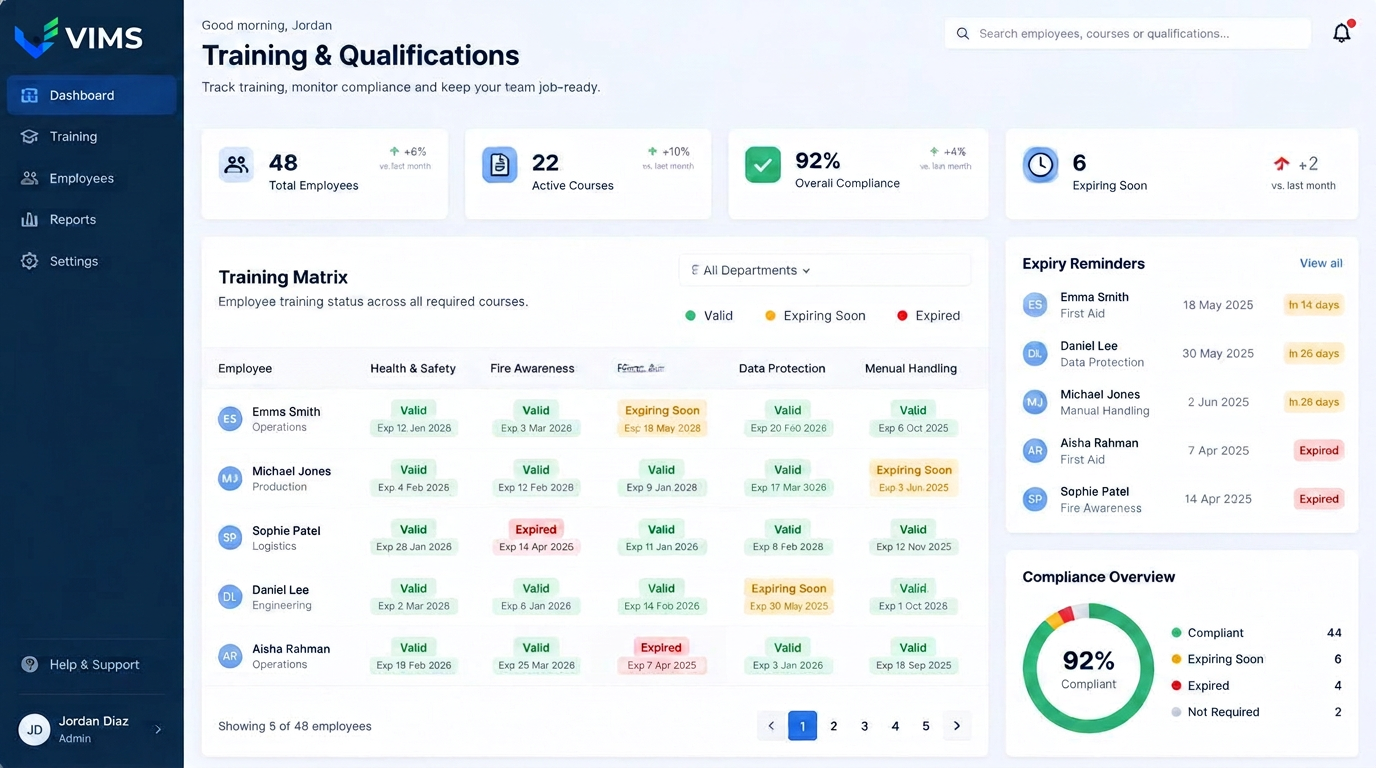
VIMS — employee training management software showing the training matrix, validity statuses and expiry reminders

A missed expiry date stops the work

An expired refresher course or medical certificate usually surfaces at the worst moment: during an inspection, before high-risk work begins, or on the day an operator is missing from the shift. The consequence is not only a formal finding but downtime and a reshuffled production schedule.

In a spreadsheet, tracking dates depends on someone's memory and discipline. A holiday, a change of the person keeping records or an intake of new employees is enough for some dates to stop being watched.

The VIMS training module reverses that. The system watches the dates and flags them in advance, and the responsible person reacts to warnings instead of scanning a table every day.

Requirements attached to the job, not to the person

The most common recording mistake is keeping everything at the level of individuals. With that approach, moving someone to another job or hiring a new employee requires working out manually which courses they need.

In VIMS the required training and qualifications are defined for the job. A forklift operator, a welder, an electrician and a warehouse worker each have a different requirement set, which an employee inherits automatically when assigned to that job.

The result is a training matrix showing people against requirements. Competence gaps become visible immediately, as does the organisational risk of only one person on site being able to perform a given task.

What the Training and qualifications module gives you

Training matrix

Employees and required courses in one grid, with validity status.

Job requirements

Training scope assigned to the job, not to a single person.

Expiry reminders

Alerts before a course or qualification expires, not after.

Documents and certificates

Scanned certificates and qualifications attached to the employee record.

Inspection ready

A list of valid and missing training available instantly.

Reports and indicators

Training completion by department, location and course type.

How training connects to the rest of VIMS

Competence is part of the process — it returns after an event, an analysis and a risk assessment change.

  1. 1Job requirements
  2. 2Training plan
  3. 3Delivery and documents
  4. 4Validity tracking
  5. 5Findings from events
  6. 6Requirements updated

Documentation ready for inspections and audits

Certificates, induction records, medical statements and trade authorisations are stored as scans on the employee record. There is no need to search personnel files or ask HR for copies.

A summary of valid and missing training for a chosen department is produced in moments, which cuts preparation time for an inspection or certification audit dramatically.

Training history stays in the system after validity ends, so the full development path of an employee remains visible.

Training linked to risk and to events

The scope of training should not come from regulations alone. The risk assessment identifies the hazards present at a job, and those hazards define training needs for specific tasks, machines and substances.

Findings from event analysis often end in a need for repeated instruction or a wider training scope. In VIMS such a finding can become an action tied to a specific group of employees.

Introducing a new chemical or a new machine also creates a competence gap, and the module shows exactly who is affected.

Frequently asked questions

Does the system track validity dates?

Yes. VIMS shows valid, expiring and expired training and sends reminders.

Can requirements be tied to a job?

Yes. You define the required training for a job and employees inherit it automatically.

Can I attach certificates?

Yes. Documents and scanned qualifications are stored on the employee record.

Can I produce a list for an inspection?

Yes. A report of valid and missing training is generated in moments.

Related modules

VIMS module

Run risk assessment online: hazards, risk levels, control measures and reviews in one place, connected to what actually happens on site.

Risk assessment

VIMS module

One substance register, current safety data sheets available from a phone and full control over what is used where on site.

Chemicals and SDS

Rounds and inspections

A safety walkaround is a cheap prevention tool, but only when it happens regularly and ends with an assigned task. This module enforces both conditions.

Rounds and inspections

See the Training and qualifications module

Book a demo and see the training matrix applied to your organization.