
VariloVIMS

VIMS for safety consultancies — many clients, one workspace

An office serving a dozen or more companies faces a different problem than a single plant. It is not a lack of expertise but keeping order across deadlines, documents and working standards for many entities at once. Every client has a different profile, size and level of documentation hygiene — and the consultant is accountable regardless.

  • Many clients
  • Consolidated deadlines
  • Office standard
  • Client access
  • Board reports
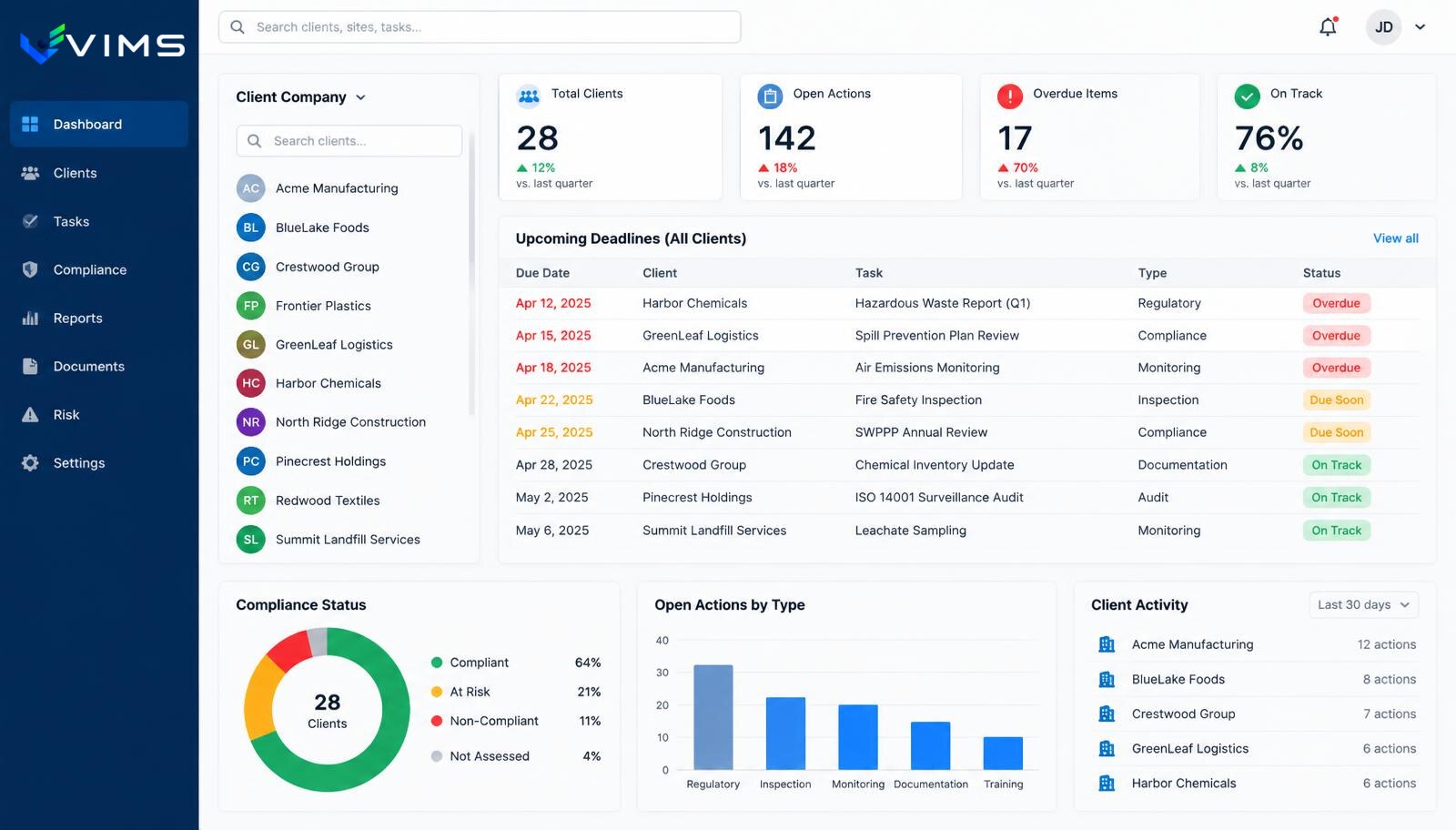
V-IMS — EHS consultancy dashboard: client company list, consolidated table of upcoming and overdue deadlines, portfolio indicators and a compliance status chart

Scale changes the nature of consulting work

With two clients a spreadsheet and a calendar are enough. With twenty, a different kind of work begins — not advisory but administrative. Which client has periodic training this month, whose exposure survey expires, where a risk assessment update is overdue after a job change.

The overhead grows non-linearly, because each client has their own files, their own job titles and their own way of announcing new hires. The office spends more time reconciling status and less time on the work the client actually pays for.

The business risk is concrete: a missed medical date or a missing training record is not an inconvenience but a professional liability issue during an inspection or after an incident.

One account, many client entities

VIMS lets an office run several clients under one access structure with context switching between companies. The consultant logs in once and works on a specific client's data without opening multiple systems or moving files between folders.

The most practical part is the consolidated deadline view: health checks, training, inspections and surveys from every client in one list sorted by date. That is a to-do list for the week, not a report to analyse.

The second element is standardisation. Risk assessment templates, inspection checklists and post-incident procedures belong to the office and can be reused with each new client, keeping quality constant regardless of which consultant handles the case.

Features a safety consultancy actually uses

Switching between clients

One login and a fast change of context between the companies, plants or branches you serve.

Consolidated deadline list

Health checks, training, surveys and inspections across all clients in one view, with overdue items highlighted.

Office templates

Your own risk assessment patterns, inspection checklists and follow-up lists, reused with each new client.

Access for client staff

A client's manager or employee can receive a narrow permission set, for example reporting incidents and viewing their own documents.

On-site inspections

A walk with checklist and photos performed on the spot, ending in a report and a dated list of recommendations.

Report for the client's board

A summary of safety status, completed actions and open recommendations, ready for a management meeting.

Client service from takeover to review

The same working standard regardless of the size of the company served.

  1. 1Client takeover
  2. 2Status inventory
  3. 3Completing records
  4. 4Deadline plan
  5. 5On-site inspection
  6. 6Dated recommendations
  7. 7Follow-up supervision
  8. 8Periodic report

Modules used in this industry

The starting set follows the processes that generate the most work and the most risk in this environment.

Employees and competence

The same people appear on the training list, in the examination schedule, in a risk assessment, on a work permit and in an accident report. If each of those lists lives its own life, sooner or later they stop agreeing. This module fixes the problem at the data level, not at the form level.

Explore the module

VIMS module

See in one view who holds valid training and qualifications, whose certificates expire soon and what is missing for a given job.

Explore the module

Medical examinations

An expired medical certificate means a worker cannot be allowed to work. With a hundred people a spreadsheet still copes. With several hundred, turnover and shift work you need a register that raises upcoming dates by itself.

Explore the module

VIMS module

Run risk assessment online: hazards, risk levels, control measures and reviews in one place, connected to what actually happens on site.

Explore the module

VIMS module

Plan an audit or round, run it from a phone, record nonconformities and launch actions immediately — without retyping results into a spreadsheet.

Explore the module

VIMS module

Report an event in seconds, run the root cause analysis, plan actions and close the case with complete documentation in one place.

Explore the module

VIMS module

No more action lists in a spreadsheet. Every action has an owner, a deadline, a status and an effectiveness check — all in one view.

Explore the module

Registers and inspections

A plant runs a dozen parallel registers: cranes, pressure vessels, forklifts, extinguishers, hydrants, electrical installations, ladders, hoists, gates. Each has its own cycle and its own owner. This module brings them into one register with one calendar.

Explore the module

Value the client sees between visits

The traditional model reduces cooperation to visits: the consultant arrives, inspects, leaves a report and disappears for a month. The client judges the service by visit count because nothing else is visible.

When the client can see their own data — training status, open recommendations, incident history — the service becomes visible between visits too. That shifts the fee conversation from the number of visits to the scope of supervision provided.

It is also a sales tool. Showing a prospect a dashboard of their own upcoming deadlines and overdue items works better than describing the service in a proposal.

Continuity that does not depend on one person

In a consultancy, client knowledge usually lives in one consultant's head and their file folder. Holiday, illness or resignation turns that into an operational problem, and taking a client over means a week of reconstructing the facts.

Keeping documentation in one system reduces handover to opening the client record: who works there, which recommendations are open, when the last inspection took place and what was agreed after the last incident.

The same property makes growth easier. Hiring another consultant no longer requires inheriting a predecessor's private archive, because the working standard lives in the system rather than in habits.

Questions from safety service providers

Can one account serve many client companies?

Yes. Served entities are kept as separate organisations with their own data, and the consultant switches context between them. The detailed access model is agreed at rollout.

Is client data kept separate?

Yes — each entity's data is separate and visibility follows granted permissions. A client cannot see another client's data.

Can the client report incidents themselves?

Yes, if the office grants that scope. Typically client staff report incidents and issues while the consultant handles classification.

Can I use my own document patterns?

Risk assessment and checklist templates can be built to your office standard and reused with each new client.

How is licensing handled for multiple entities?

Licence scope for multi-client work is agreed individually, as it depends on the number of entities served and their headcount.

Other industries

Industry: manufacturing and heavy industry

See

Industry: food industry and FMCG

See

Industry: logistics, warehousing and distribution

See

Industry: construction and contracting

See

Industry: multi-site organisations

See

See a dashboard for your client portfolio

Book a call and we will walk through serving several companies in one view of deadlines and actions.