
VariloVIMS

Employees and competence — one record instead of ten separate name lists

The same people appear on the training list, in the examination schedule, in a risk assessment, on a work permit and in an accident report. If each of those lists lives its own life, sooner or later they stop agreeing. This module fixes the problem at the data level, not at the form level.

  • Personnel record
  • Competence matrix
  • Role requirements
  • Fitness to work
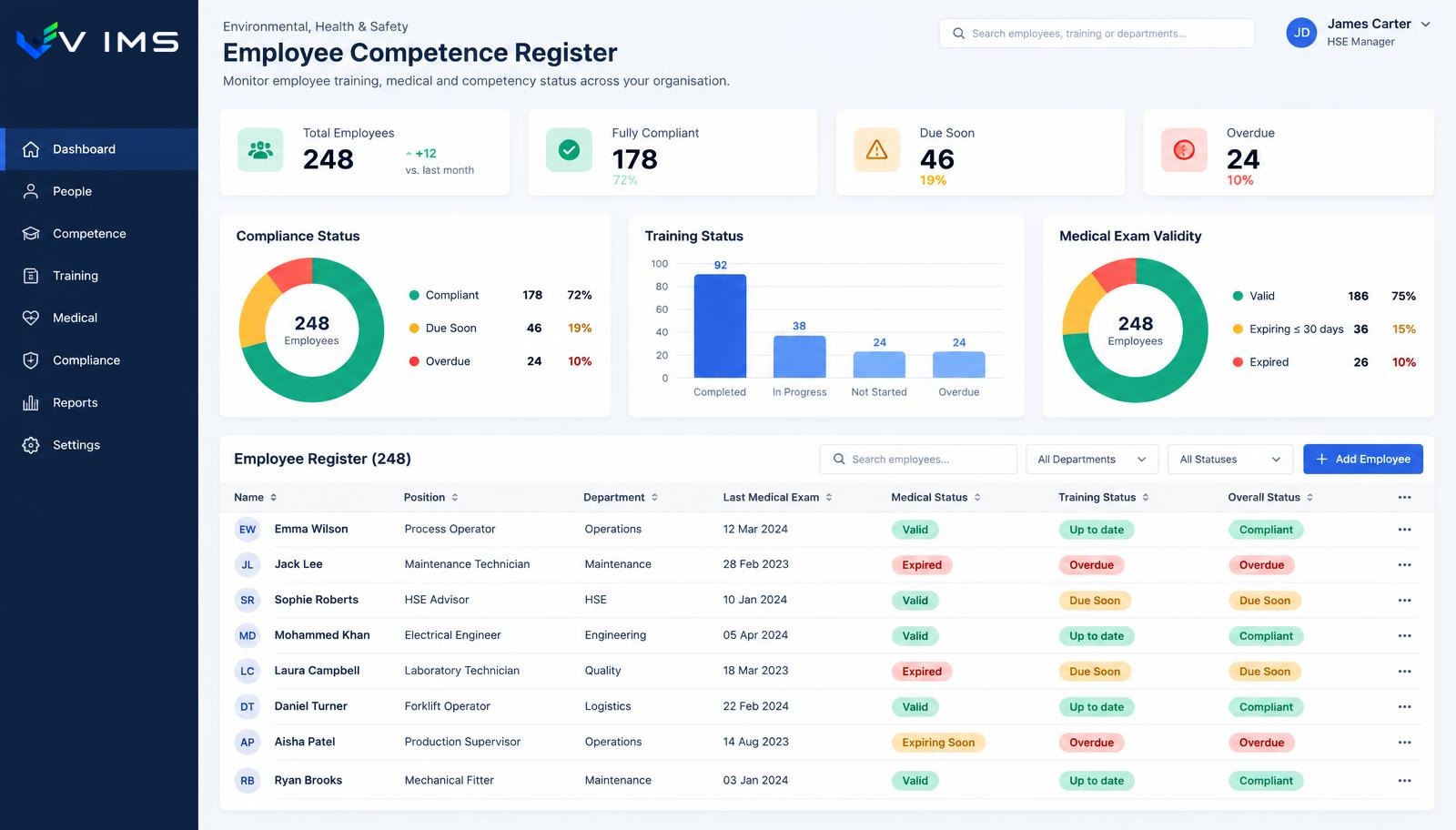
V-IMS — employee and competence module showing people with position, department, medical and training validity and overall fitness-to-work status

Why divergent people data is the most expensive kind

In most plants information about a worker is split across several independent sources: the HR system knows the contract and department, a safety spreadsheet knows the training, a calendar knows the examinations, and the shift leader knows who actually does what. Each source is current within its own scope and out of date in every other.

The gap only shows at the edges. Someone moves from warehouse work to operating a forklift and formally stays in the old training group. Someone returns after a long absence and nobody connects that fact with a follow-up examination. Someone is moved to another shift and their qualifications remain attached to the previous supervisor.

The result is rarely a spectacular mistake — it is a quiet erosion of trust in the data. After a year nobody relies on the list, and before an inspection everything is checked by hand, person by person. That is why the Employees module is not an administrative extra in VIMS; it is the layer the other processes stand on.

The role defines requirements, the person holds the proof

The key distinction is simple: a position states what is required, a personal profile states what has been confirmed. A crane operator needs a certificate covering work at height, a statutory qualification, workplace instruction and acknowledgement of the risk assessment — that list belongs to the role, not to an individual.

Assigning a new person to that role therefore creates the full set of expectations automatically, instead of relying on someone recalling what still needs arranging. It works in reverse too: changing the requirements of a role immediately reveals everyone who does not yet meet them.

The model copes well with plant reality, where people hold two roles, cover for colleagues across departments, or take on extra work that needs separate authorisation. Requirements accumulate from roles rather than being typed in per person.

With turnover and seasonal work this saves the most time, because the repetitive part of the job stops being working out what is missing and becomes simply closing the gaps.

What the Employees module gives you

People and structure

Employees assigned to departments, locations, shifts and positions, with a history of those assignments.

Role profile

Required training, qualifications, examinations and exposures described once on the role, not on every person.

Competence matrix

A cross view of person against requirement, with gaps and expired items clearly marked.

Fitness status

One answer to whether a given person may carry out their work today.

All dates in one place

Examination, training and qualification validity calculated together instead of in separate reminder files.

Management views

Completeness by department, shift and position, with a list of items still to close.

The employee data lifecycle

Every change of assignment recalculates requirements, so the register does not quietly go stale.

  1. 1Person added and placed in the structure
  2. 2Role selected and its requirements applied
  3. 3Existing training and certificates recorded
  4. 4Gaps and fitness status calculated
  5. 5Alerts raised before validity expires
  6. 6Record updated when the role or scope of work changes

One record, many processes around it

The value of a shared register shows when something happens. Recording an incident starts by picking the person from the list, so their role, training and examination dates are known immediately. Root cause analysis does not need that data gathered again — it is part of the case context.

Issuing a work permit uses the same people and the same requirements. A crew stops being a list of names copied from paper and becomes a set of profiles where missing authorisations are visible before work starts.

Training and examinations run the other way: confirmations flow back and update the person's status. The cycle closes without retyping — a fact is entered once and appears everywhere it matters.

Scope of data and sensible limits

The Employees module is not a payroll system and should not become one. Its scope is the data needed to manage safety and compliance: organisational assignment, role, the requirements it generates and the confirmations that satisfy them.

Pay, payroll absence and medical records stay outside the system. Limiting the scope simplifies rollout and reduces the number of people who need access to the register at all.

In practice three visibility levels work well: full for the safety team and HR within the requirements scope, limited for supervisors over their own team, and minimal for the worker, who sees their own dates and documents.

It is worth agreeing these levels at the start, before several hundred records exist, because tidying permissions later is always harder than designing them upfront.

Frequently asked questions about the Employees module

Does the module replace an HR system?

No. It covers the data needed to manage safety and competence: structure, roles, requirements and confirmations. Payroll and full personnel files stay in the HR system.

What happens when someone changes role?

The system compares the new role's requirements with what the person already holds and shows the difference — a new referral, extra training or an additional qualification.

Can people hold several positions?

Yes. Requirements accumulate from assigned roles, so someone covering in another department does not drop off any requirement list.

Can employees see their own data?

Visibility is configured by the organisation. Most often a worker sees their own dates and documents without access to anyone else's.

How does it connect to the rest of VIMS?

The same profile is used by training, medical examinations, risk assessment, work permits and incident reporting, so data is never entered twice.

Can an existing employee list be imported?

Yes. Rollout usually starts by migrating the current register and tidying it around roles and validity dates.

Related modules

VIMS module

See in one view who holds valid training and qualifications, whose certificates expire soon and what is missing for a given job.

Training and qualifications

Medical examinations

An expired medical certificate means a worker cannot be allowed to work. With a hundred people a spreadsheet still copes. With several hundred, turnover and shift work you need a register that raises upcoming dates by itself.

Medical examinations

Permit to work

No more paper permits travelling around the site in search of a signature. The application, task risk assessment, approvals and working conditions run in one workflow visible to everyone involved.

Permit to work

Build one shared register of people and competence

Book a demo and see how a role profile feeds training, examinations and work permits.