
Permit to work — an electronic workflow for high-risk activities

No more paper permits travelling around the site in search of a signature. The application, task risk assessment, approvals and working conditions run in one workflow visible to everyone involved.

  • Hot work
  • Work at height
  • Confined space
  • LOTO
  • Contractor control
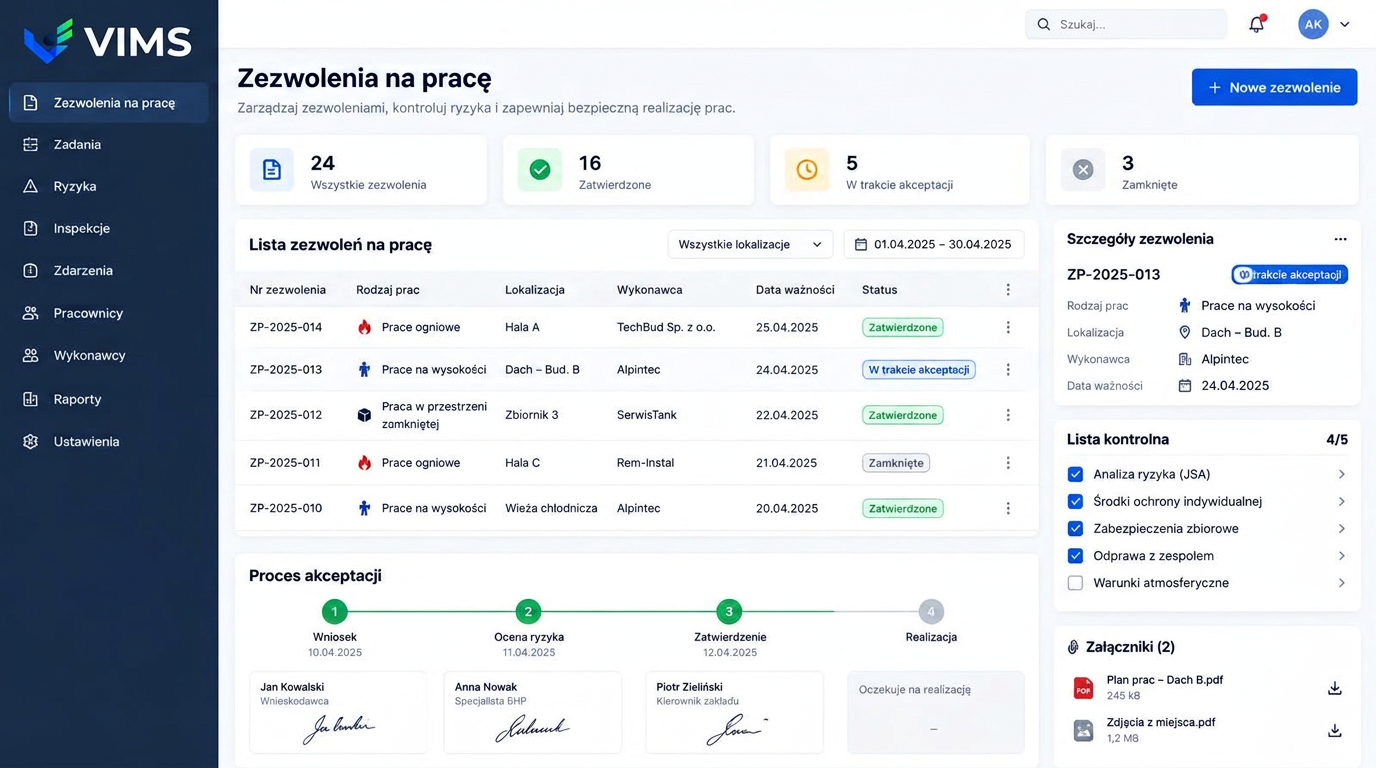
VIMS — electronic permit to work module showing hot work, work at height and confined space permits, the approval process and a pre-start checklist

A paper permit costs more than it looks

A paper permit works as long as everyone is in the same place. Trouble starts when the approving manager is at the other end of the site, the contractor is waiting by the tank and the form sits in a binder in the office. Work is delayed or, worse, starts without formal authorisation.

The second difficulty is oversight. With dozens of active permits a month nobody can say on the spot how much hot work is running in the hall, which permits expire at the end of this shift, or whether the contractor on the roof still holds valid qualifications. The information exists, but it is scattered across folders.

The VIMS permit module moves the process into one register available from a computer and a phone. Every permit carries a number, work type, location, contractor, expiry date and status — from application through risk assessment and approvals to closure and handover of the work area.

Types of work covered by a permit

Hot work — welding, cutting, grinding and anything producing flame or sparks — requires fire protection, inspection of the surroundings and a fire watch after completion. The permit form walks through those conditions step by step, including the observation period after the job.

Work at height covers collective and personal fall protection, anchor points and rules for the exclusion zone below. Confined space entry requires atmospheric testing, ventilation, an attendant outside and a rescue plan.

Separate categories cover electrical work with lockout and tagout, excavation with utility surveys, pressure system work and any job performed by an external company, where contractor document checks are added to the conditions.

What the Permit to work module gives you

Apply from phone or desktop

Work type, location, scope, contractor and planned hours captured in a ready form, with no paper version.

Risk assessed before authorisation

A task-level hazard analysis linked to the permit — the application cannot progress without it.

Pre-start checklist

Protective equipment, collective safeguards, team briefing and weather conditions ticked off before work begins.

Multi-step approval

Applicant, safety function and plant manager in sequence, each step stamped with the person and the date.

Validity control

Alerts for permits approaching expiry and for work that has never been formally closed.

Live picture of work in progress

Active permits by location, work type and contractor, available to the duty officer and the safety team.

Permit workflow from application to closure

Every stage has an owner, a date and a status — nothing stays in an informal agreement.

  1. 1Permit application
  2. 2Task hazard analysis
  3. 3Contractor and document check
  4. 4Approvals and authorisation
  5. 5Supervised execution
  6. 6Area handover and closure

What each party sees

The applicant — usually a works supervisor or the contractor's coordinator — submits the request and sees exactly where it stands in the approval chain, without calling around to ask who has not signed yet.

The safety function reviews the risk analysis, the completeness of protective measures and the documents of the assigned workers. It also sees the contractor's previous permits and remarks from field inspections.

The plant manager authorises the job with the full context: location, neighbouring installations, other permits issued for the same area and the planned dates. That matters for simultaneous operations, where the risk comes from activities overlapping.

Closing the permit and handing back the area

Issuing a permit is only half the process. Closing it matters just as much: confirming that work has finished, the area is tidy, safeguards are restored and, for hot work, the fire watch has been completed.

VIMS requires a formal closure for every permit and highlights those left open past their planned date. Nothing stays in the register with an unknown status, and an auditor can follow the full document lifecycle.

Remarks from inspections during the job — a missing barrier, faulty equipment — can create a corrective action linked to the contractor and the specific permit.

Frequently asked questions about permits to work

Can a permit be raised from a phone?

Yes. The form works on phones and tablets, so the application can be submitted from the work location and approved remotely.

Can we define our own work types?

Yes. Beyond the usual categories — hot work, height, confined space, electrical — you can add site-specific types with their own checklist and approval path.

What happens when work runs past the planned date?

The permit stays visible as overdue and the safety team is alerted. Extending it requires a deliberate decision by an authorised person rather than a silent assumption.

Does the module show simultaneous work in the same area?

Yes. The register filters by location, so overlapping activities and the extra risk they create are visible.

Do permits link to contractor management?

Yes. The contractor named on a permit comes from the contractor register, so their document and qualification status is visible at authorisation.

Related modules

VIMS module

Run risk assessment online: hazards, risk levels, control measures and reviews in one place, connected to what actually happens on site.

Risk assessment

Contractor management

Collect the contractor's documents, verify their workers' qualifications, deliver the site induction and grant access before anyone passes the gate.

Contractors and external companies

VIMS module

Plan an audit or round, run it from a phone, record nonconformities and launch actions immediately — without retyping results into a spreadsheet.

Audits and inspections

Move permits to work into one register

Book a demo and follow a hot work permit through the full workflow for your own site.