
VariloVIMS

VIMS for occupational safety — one process instead of scattered duties

Safety professionals rarely lose time on the technical work itself. They lose it establishing the facts: who holds valid training, whether the risk assessment was reviewed after a job change, which action after an incident was actually completed. VIMS links these facts into one chain where every step has an owner and a deadline.

  • Employees
  • Risk assessment
  • Training and health
  • Incidents and CAPA
  • Inspections
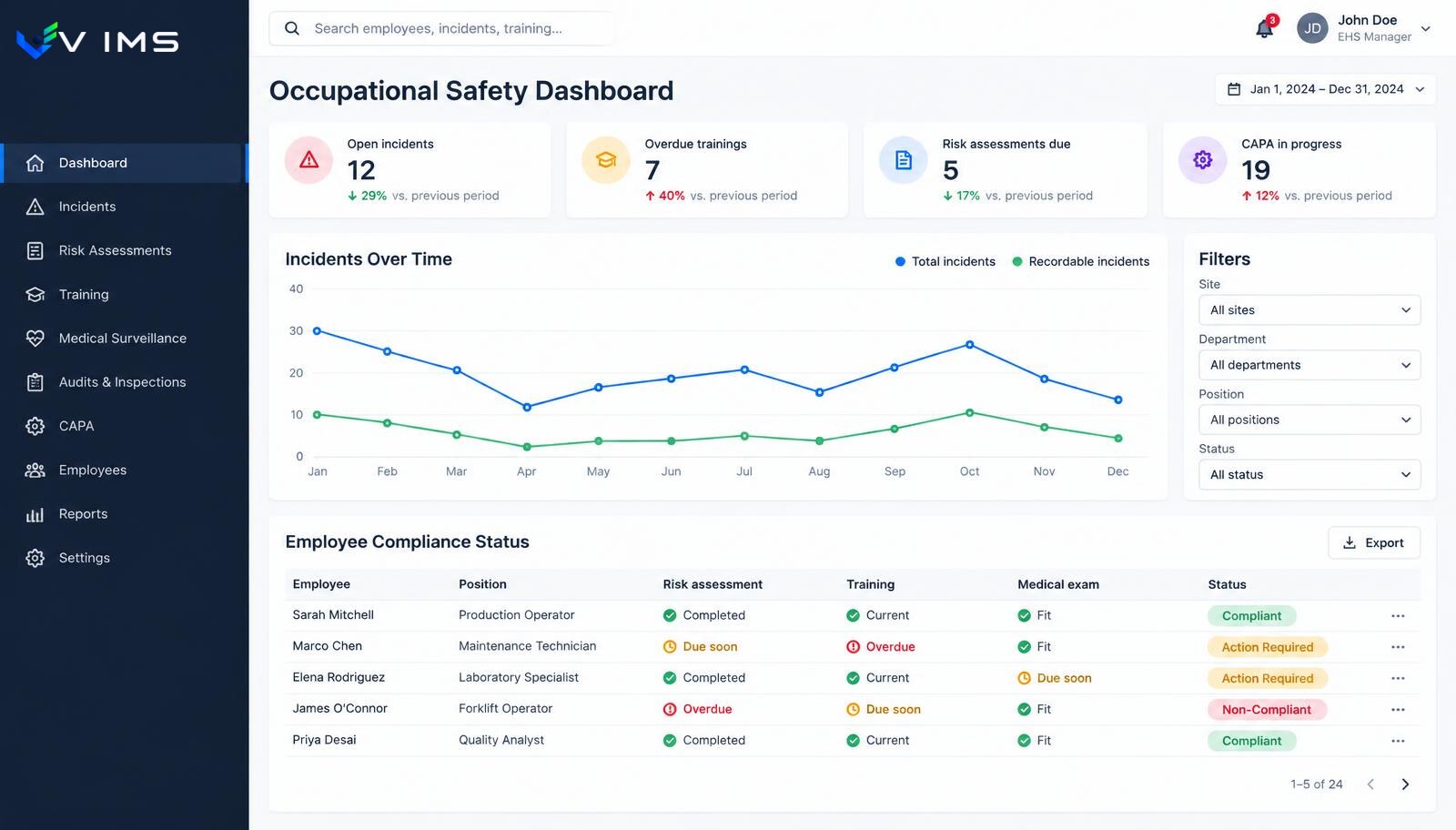
V-IMS — occupational safety dashboard with open incidents, overdue training, risk assessments due, a twelve-month incident chart and an employee compliance table

Why spreadsheets stop working sooner than expected

In most plants the first safety system is a set of files: one for training dates, one for medical checks, one for the incident log, one for actions after inspections. Each is correct on its own. The problem appears when they must be combined — that is the only moment you notice that a transferred employee holds valid periodic training but no referral for the examination required by the new hazards.

The second cost is duplicated work. The same person is entered in five places, and a job change requires five corrections. In practice someone always misses one, so the files disagree and nobody can say which one is current.

The third cost is the least visible: no history. A spreadsheet shows today's state and overwrites yesterday's. A year later, when someone asks exactly when a control measure was introduced and who approved it, the answer has to be reconstructed from email.

What changes with a shared data model

VIMS assumes that an employee, a position, a location and an action are objects, not columns in successive files. Adding a person once makes them visible to every process: the risk assessment tied to their position, required training, examination dates, involvement in incidents and inspections.

Questions then change character. Instead of 'where is the current list', you ask 'show people who will lose a qualification required for their position within 30 days'. The system answers in seconds because the requirement and the person sit next to each other.

The most important effect is organisational: a conversation with a line manager stops being about whether something was done. It becomes a conversation about why a deadline slipped, because both sides see the same status in the same place.

What a safety team actually runs in one environment

Employee and position register

One source of truth for people, positions and locations. A transfer updates requirements instead of forcing edits in several files.

Risk assessments tied to positions

A risk card is not a document in a folder but a record attached to a position, with a review date and change history.

Training and medical dates in one calendar

Required training, qualifications and examinations appear as upcoming deadlines rather than columns to filter by hand.

Incident and accident register

Report, classification, findings, documentation and actions in one record, with timestamps and clear ownership.

Corrective actions with verification

Every action has an owner, a deadline and an effectiveness check. Closing without verification shows up as a gap.

Field walks and inspections

A walk completed on a phone creates a record with location and observations, each of which can trigger an action.

One chain: from a person to a verified action

Every step stores data the next one uses, so nothing needs retyping and the history builds itself.

  1. 1Employee and position on file
  2. 2Risk assessment for the position
  3. 3Required training and examinations
  4. 4Inspection or walk in the area
  5. 5Incident or observation
  6. 6Root cause and action
  7. 7Effectiveness verification
  8. 8Risk assessment update

Modules in this solution

Each module works on its own, yet together they form the single data flow described above.

Employees and competence

The same people appear on the training list, in the examination schedule, in a risk assessment, on a work permit and in an accident report. If each of those lists lives its own life, sooner or later they stop agreeing. This module fixes the problem at the data level, not at the form level.

Explore the module

VIMS module

Run risk assessment online: hazards, risk levels, control measures and reviews in one place, connected to what actually happens on site.

Explore the module

VIMS module

See in one view who holds valid training and qualifications, whose certificates expire soon and what is missing for a given job.

Explore the module

Medical examinations

An expired medical certificate means a worker cannot be allowed to work. With a hundred people a spreadsheet still copes. With several hundred, turnover and shift work you need a register that raises upcoming dates by itself.

Explore the module

VIMS module

Report an event in seconds, run the root cause analysis, plan actions and close the case with complete documentation in one place.

Explore the module

VIMS module

No more action lists in a spreadsheet. Every action has an owner, a deadline, a status and an effectiveness check — all in one view.

Explore the module

Rounds and inspections

A safety walkaround is a cheap prevention tool, but only when it happens regularly and ends with an assigned task. This module enforces both conditions.

Explore the module

LMRA

A job risk assessment describes a workplace under typical conditions. LMRA answers a different question: is this work safe here, right now, with this crew?

Explore the module

Where to start so the rollout does not stall on migration

The most common mistake is moving everything at once. A plant has ten years of history in files and tries to import it before using the system. The result: months of preparation, no operational benefit and growing fatigue.

The reverse order works better. Live data goes first: people and positions, current training and examination dates, open actions. Closed history can stay in the archive and be added gradually, or never — nobody manages it day to day.

The second stage is one end-to-end process, ideally incidents. It has a clear beginning and end, involves line managers and quickly exposes the difference between 'reported' and 'effectively closed'. Only the third stage covers cyclical areas: walks, inspections and reviews.

Measures that say more than an incident count

Incident counts are lagging indicators and, in smaller plants, statistically unstable. A single event can move the chart more than a real change in working conditions.

Leading indicators are more useful: share of actions closed on time, median time from report to owner assignment, walks completed versus planned, share of actions with confirmed effectiveness, and people with a requirement expiring within 30 days.

Each describes organisational behaviour rather than chance. If the median time to assign an owner grows from two days to nine, the problem is visible long before it reaches accident statistics.

Questions safety teams ask most often

Does the system replace paper documentation?

It keeps data and history electronically and allows export. Which documents the organisation additionally keeps on paper is its own decision; the system does not impose one.

Can we start with only part of the scope?

Yes. Modules share data but do not have to start together. Most organisations begin with people and deadlines plus the incident register.

Who enters data day to day?

Reports and walks are usually done by supervisors and field staff, while classification, analysis and action oversight stay with the safety team.

Does the system assess legal compliance?

No. It organises data, deadlines and evidence. Compliance judgement remains a human decision based on full organisational and legal context.

What about staff without computer access?

Field activities are designed for a phone: short forms, list selection, a photo as evidence. Desk work is reviewing what came in.

How long does the first stage take?

It depends on the input data. With a complete list of people and deadlines the first area starts quickly; cleaning the data usually takes longer than the configuration.

Other solutions

Solution for quality

See

Solution for food safety

See

Solution for audit and compliance

See

Solution for fire safety

See

See VIMS on your own safety process

We will walk through the flow from employee and risk assessment to action verification, using an example close to your site.