
VariloVIMS

VIMS for fire safety — deadlines, reviews and actions in one register

Fire protection rarely fails on knowledge. It fails on the calendar: a review slipped by a quarter, equipment added after an extension and never entered into the plan, a contractor report nobody turned into tasks. VIMS keeps all three under control at once.

  • Equipment register
  • Review deadlines
  • Inspections
  • Actions
  • Contractors
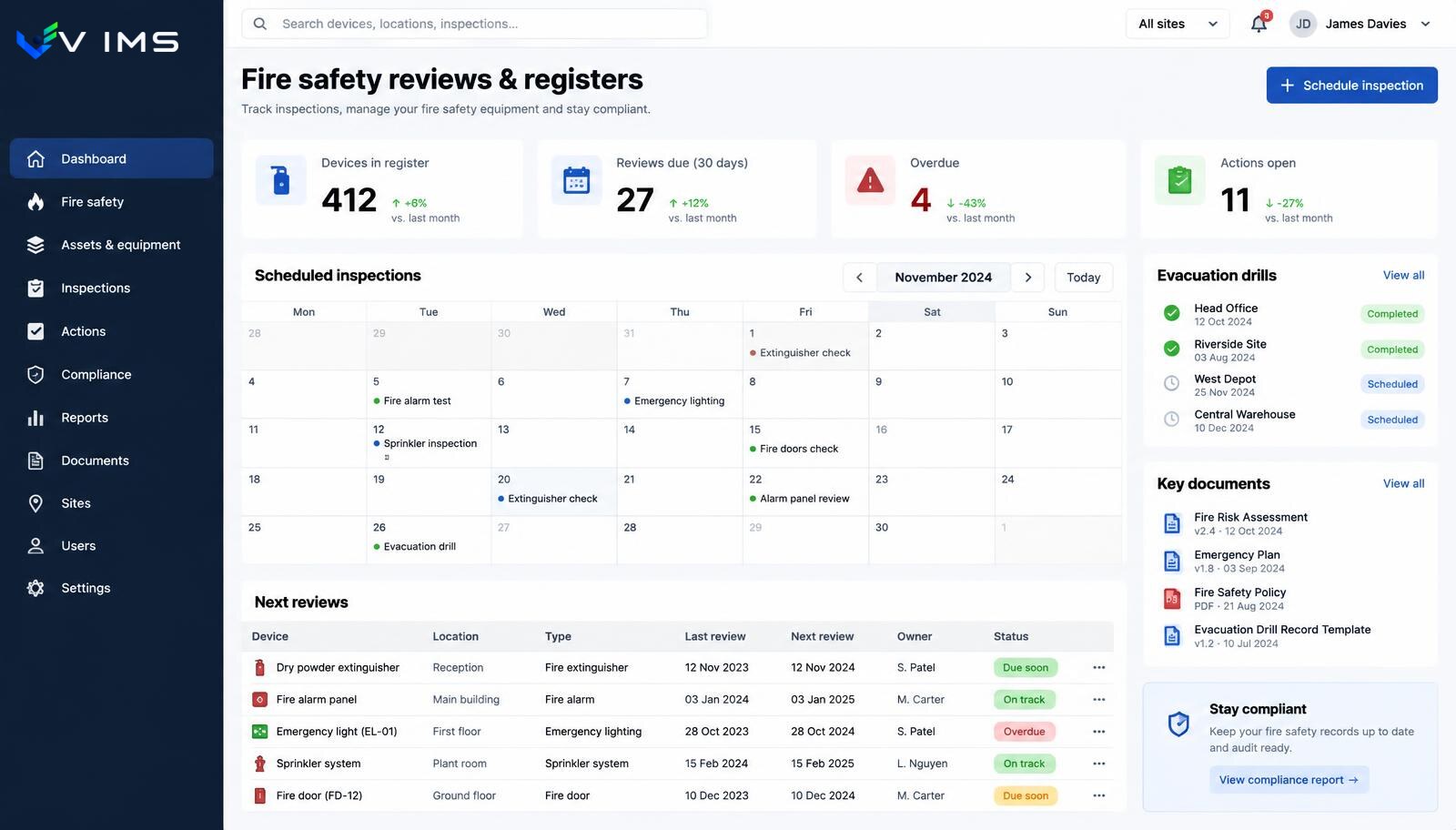
V-IMS — fire safety dashboard with devices in the register, reviews due within 30 days, overdue items, an inspection calendar and a device table with review dates

Three common gaps in fire protection oversight

The first is a register that no longer matches reality. After every extension, warehouse move or installation replacement, equipment appears that is not on the list. Formally the review plan is one hundred percent delivered — it simply does not cover everything it should.

The second is a report that never becomes a task. A contractor performs the review, leaves a report with remarks, and the report goes into a binder. The remarks need decisions and money, so they wait. At the next review they reappear, now marked as repeated.

The third is scattered responsibility. Maintenance tracks some dates, facility administration others, the safety specialist the rest. Everyone knows their slice, nobody knows the whole, and when a person leaves the knowledge leaves with them.

A register that reminds you about itself

In VIMS a device or facility is a record with location, type, owner and review cycle. The next review date is not an entry in one person's calendar but a property of the record, visible to everyone authorised.

The question 'what needs a review in the next thirty days' becomes a filter rather than a half-day project. The same applies to overdue items, which stop being a surprise revealed during an inspection.

Report remarks are entered as actions with an owner and a date. Closing requires evidence — a repair record, a photo, a replacement confirmation. History stays with the device, so the next review shows what was done before.

What fire safety oversight covers in VIMS

Equipment and facility register

Devices, installations and fittings as records with location, type, review cycle and owner.

Review schedule

Review cycles kept on the record. Upcoming and overdue items are visible without manual date arithmetic.

Site inspections and walks

Inspection templates performed on site, with control points and immediate reporting of irregularities.

Actions from report findings

A remark from a report becomes a task with an owner and a date, and closing it requires evidence.

Contractors and their documents

Review providers kept as entities with documents and dates, not just a name on a paper report.

History on the device

All reviews, remarks and repairs in one place, surviving a change of responsible person.

The fire protection oversight flow

The register sets the dates, the inspection delivers them, and findings return as evidenced actions.

  1. 1Device or facility in the register
  2. 2Cycle and next review date
  3. 3Inspection or contractor review
  4. 4Findings and report remarks
  5. 5Action with owner and date
  6. 6Completion evidence on the record
  7. 7Next review date updated
  8. 8Backlog and priority report

Modules in this solution

Each module works on its own, yet together they form the single data flow described above.

Registers and inspections

A plant runs a dozen parallel registers: cranes, pressure vessels, forklifts, extinguishers, hydrants, electrical installations, ladders, hoists, gates. Each has its own cycle and its own owner. This module brings them into one register with one calendar.

Explore the module

Rounds and inspections

A safety walkaround is a cheap prevention tool, but only when it happens regularly and ends with an assigned task. This module enforces both conditions.

Explore the module

VIMS module

No more action lists in a spreadsheet. Every action has an owner, a deadline, a status and an effectiveness check — all in one view.

Explore the module

VIMS module

See in one view who holds valid training and qualifications, whose certificates expire soon and what is missing for a given job.

Explore the module

Contractor management

Collect the contractor's documents, verify their workers' qualifications, deliver the site induction and grant access before anyone passes the gate.

Explore the module

Building a register that does not go stale in six months

A register goes stale when updating it is a separate administrative duty. If adding a device requires notifying the person who keeps the spreadsheet, sooner or later somebody will not.

It works better to tie updates to a process that happens anyway. An inspection that encounters an item missing from the register should end with a request to add it. An installation change handled as a change request should ask about the impact on the register and review cycles.

A partial inventory rule also helps: instead of one annual count, review one area each month. Effort spread over time is sustainable; a one-off campaign usually never repeats.

What to do with remarks that cannot be fixed now

Some report remarks require capital spend and will not be completed this month. Removing them from the register is the worst option, because the justification disappears with them.

A better approach is a record with a realistic date and a status that reflects reality: budgeted, awaiting decision, in progress. The backlog then shows priorities rather than just delays.

Such a register also helps budget conversations. A summary of remarks repeated across several reviews is a stronger argument than a single request, because it shows persistence rather than a one-off observation.

Questions about fire protection

Does the system include ready-made fire equipment registers?

Registers are built on records with types, locations and review cycles. Scope and dictionaries are matched to a specific site's equipment during configuration.

Can several sites be managed at once?

Yes. Location is a record attribute, so reports can be filtered by site, area or responsible person.

How is a contractor report entered?

The report is attached to the review and its remarks are created as actions, so document and tasks do not drift into two separate places.

Does the system send deadline reminders?

Dates are record attributes shown as upcoming and overdue items. How responsible people are notified is agreed during configuration.

Can fire protection run together with occupational safety?

Yes, and it usually should, because both use the same locations, people and action flow.

What about documentation to present during an inspection?

Data and attachments belong to records, so they can be found and exported. Which documents are additionally kept on paper remains the organisation's decision.

Other solutions

Solution for safety teams

See

Solution for quality

See

Solution for food safety

See

Solution for audit and compliance

See

Let us review the deadlines at your site

We will show the equipment register, the review calendar and the flow of report remarks on an example close to your organisation.