
VariloVIMS

VIMS Field — field work connected to the central system

Scan. Complete. The data is already in the process. VIMS Field moves selected activities from the desk to the phone so an observation made on the shop floor does not end up as a note in a hi-vis pocket.

  • QR codes
  • NFC tags
  • Checklists
  • Photos and location
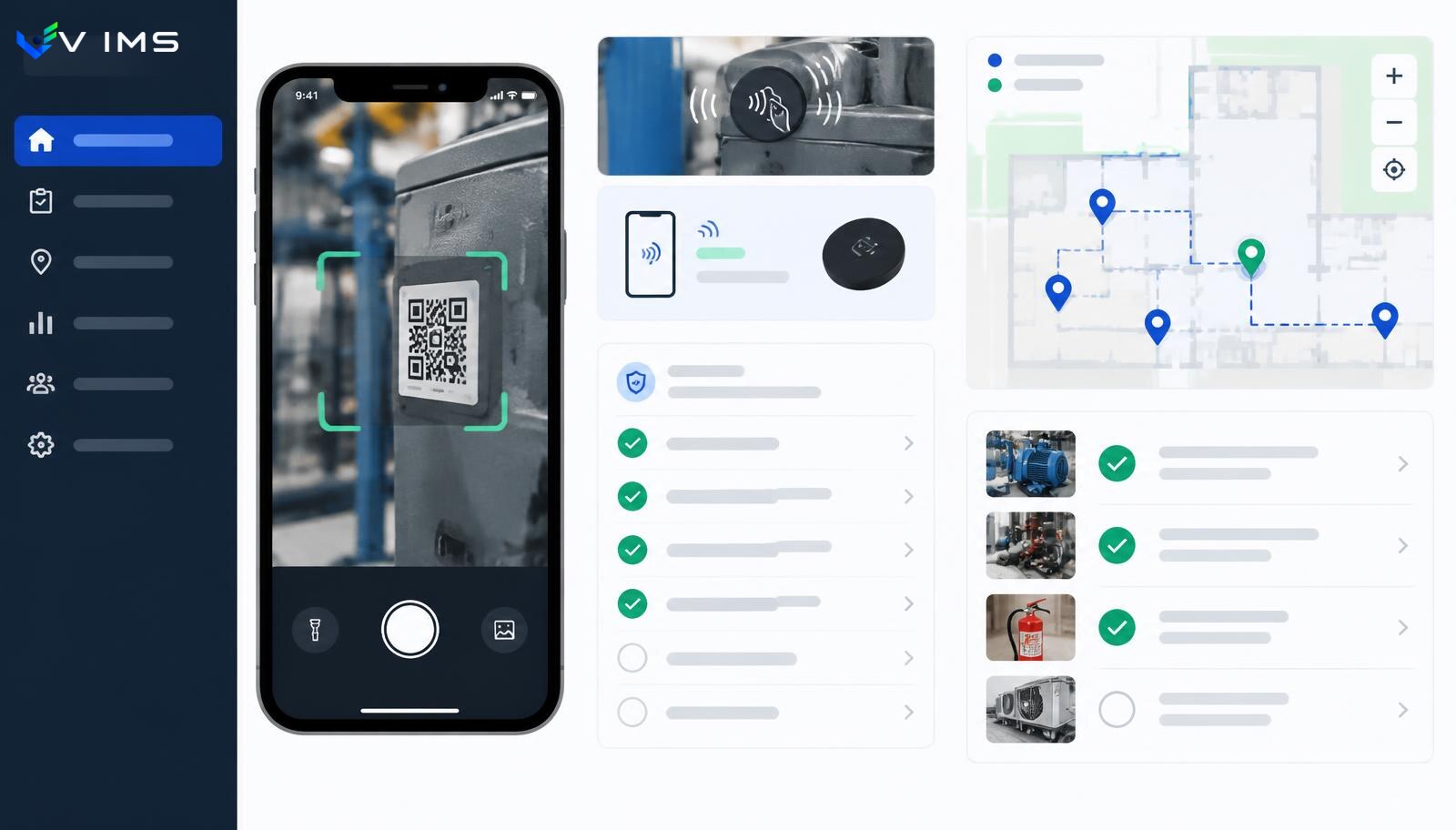
VIMS Field — mobile safety inspection scanning a QR code on a machine, with a walk checklist and a map of inspection points

Data is created where the risk is

The biggest information loss in safety systems does not happen during analysis. It happens on the way from the shop floor to the computer. A supervisor spots a loose guard, a foreman sees a blocked escape route, an operator hears an odd noise — and every one of those observations has to be remembered, typed up in the evening or passed on verbally. Some of them never survive the trip.

VIMS Field removes that trip. An inspection point — a machine, a zone, an extinguisher, a rack, a switchboard — gets its own QR code or NFC tag. Scanning opens exactly the form that belongs to that point: the right checklist, the right history, the right requirements. Nobody has to search a list or remember an asset number.

The effect shows first in reporting volume. When logging an observation takes seconds instead of a quarter of an hour, people start reporting small things — and small things are what precede serious events.

A checklist is a working tool, not a formality

A field inspection only makes sense when its result triggers action. In VIMS a checklist item marked as non-conforming can immediately create a task with an owner and a deadline, attach a photo as evidence and tie the observation to a specific location and asset. No separate report needs to be retyped into an action register later.

Checklists are defined per asset type and inspection type, so a switchboard walk looks different from a warehouse housekeeping check, and a welding station audit differs from a daily forklift check. The same mechanism supports safety walks, periodic inspections, safety conversations and pre-task LMRA.

For the supervisor, what matters most is what follows: all results land in one register showing how many inspections were planned, how many were done, where the same remarks keep recurring and which actions are overdue.

What the field layer delivers

QR and NFC scanning

An inspection point identified in one gesture — no list searching and no asset-number mistakes.

Checklists matched to the asset

A different question set for a machine, a storage zone, fire equipment and a workstation, with previous inspection history.

Task straight from an observation

A negative answer can create an action with an owner and a deadline instead of ending up in a note.

Location context

Every report is tied to a place and an asset, so summaries show where problems genuinely cluster.

Reporting in under a minute

A simplified form for employees: description, photo, place. The shorter the path, the more early signals arrive.

Inspection plan and delivery

A view of planned, completed and skipped inspections broken down by area and responsible person.

The field inspection loop

From scanning a point to closing an action — no retyping and no report circulating by email.

  1. 1Scanning a QR code or NFC tag at the workplace
  2. 2Opening the right checklist together with asset history
  3. 3Rating items, adding photos and field notes
  4. 4Automatic creation of actions for negative findings
  5. 5Assigning owner, deadline and priority
  6. 6Confirming completion and closing in the action register

Modules using this layer

Rounds and inspections

A safety walkaround is a cheap prevention tool, but only when it happens regularly and ends with an assigned task. This module enforces both conditions.

Explore the module

LMRA

A job risk assessment describes a workplace under typical conditions. LMRA answers a different question: is this work safe here, right now, with this crew?

Explore the module

Hazard reporting

The cheapest information in a plant is the one that arrives before an accident. This module shortens the path from spotting a hazard to deciding on an action, and makes sure the reporter hears back.

Explore the module

Registers and inspections

A plant runs a dozen parallel registers: cranes, pressure vessels, forklifts, extinguishers, hydrants, electrical installations, ladders, hoists, gates. Each has its own cycle and its own owner. This module brings them into one register with one calendar.

Explore the module

VIMS module

Plan an audit or round, run it from a phone, record nonconformities and launch actions immediately — without retyping results into a spreadsheet.

Explore the module

Safety conversations

Few workers fill in a form to say that a guard gets in the way or that a procedure is unrealistic at the current pace. They will say it in a short conversation at the machine. This module structures those conversations and turns them into usable knowledge.

Explore the module

How to tag a site so this actually works

Field rollouts rarely fail on technology. They fail on labelling. A well-planned grid of inspection points should follow how people actually move around the site, not the structure of an asset spreadsheet. A point belongs where the inspector already stops: at the machine panel, at the zone entrance, on the post beside the rack.

QR codes work well where surfaces are clean and dry and access is easy. NFC tags are more convenient in dirty, wet or poorly lit places where camera reading is unreliable. In practice most sites use both, choosing per zone.

It is also worth agreeing a naming convention up front. If a name carries area, asset type and number, later reports read cleanly with no extra work. If names are improvised, after a year nobody will tell 'hall 2 – press' from 'hydraulic press, hall II'.

Who really uses Field

The first group is supervisors and foremen. For them the field layer mainly ends duplicated work: no paper record to retype into a spreadsheet afterwards. The inspection finishes when they leave the zone, not an hour later at a desk.

The second group is employees. Their involvement is usually limited to a simple hazard report or a safety conversation, yet this group determines the volume of early signals. The form must be short, understandable and available without searching — ideally after scanning a code at the workplace.

The third group is the EHS and quality function. For them Field provides data that simply did not exist before: recurrence of remarks in specific zones, real inspection frequency and response time to reports. That turns a general discussion into a specific one.

Questions about VIMS Field

Is a separate mobile app required?

The field layer is designed for phone use with the shortest possible path from scanning a point to the right form. The exact scope available on mobile is always confirmed against the current implementation state.

What is the difference between a QR code and an NFC tag?

QR codes are cheap and easy to print but need a clean surface and decent light. NFC tags are more durable and work in harsher conditions but cost more. Combining both per zone usually works best.

Does an inspection finding create a task immediately?

Yes — that is the core benefit of running field work in one system. A negative finding can create an action with an owner and deadline, landing in the same register as actions from incidents and audits.

How do we verify that walks really happen?

The inspection plan shows which points were due in a period and which were actually visited. Gaps appear as skipped points rather than as missing data.

Can an employee without an account report a hazard?

Access rules for reporting are agreed during implementation, because they depend on the organisation's security policy and the current configuration. We do not promise capabilities that have not been confirmed in the customer environment.

What about areas with no signal?

Network conditions in halls and warehouses vary, so handling of such locations is agreed during pre-implementation analysis together with the customer's IT team.

Other platform layers

VIMS Intelligence

AI assists. People approve. The intelligence layer shortens the most tedious part of working with documents and data, without hiding the source or taking over responsibility for the decision.

See

VIMS analytics

A safety report is useful when it comes from data already in the system, not from a spreadsheet stitched together once a quarter. In VIMS the indicators come straight from operational registers, so you never have to choose between being current and being credible.

See

See what a safety walk looks like in VIMS Field

We will show scanning an inspection point, the checklist, and the moment a field remark turns into a task with a deadline.