
Hazard reporting — the signal from the shop floor that does not get lost

The cheapest information in a plant is the one that arrives before an accident. This module shortens the path from spotting a hazard to deciding on an action, and makes sure the reporter hears back.

  • Near miss
  • Safety culture
  • ISO 45001
  • QR reporting
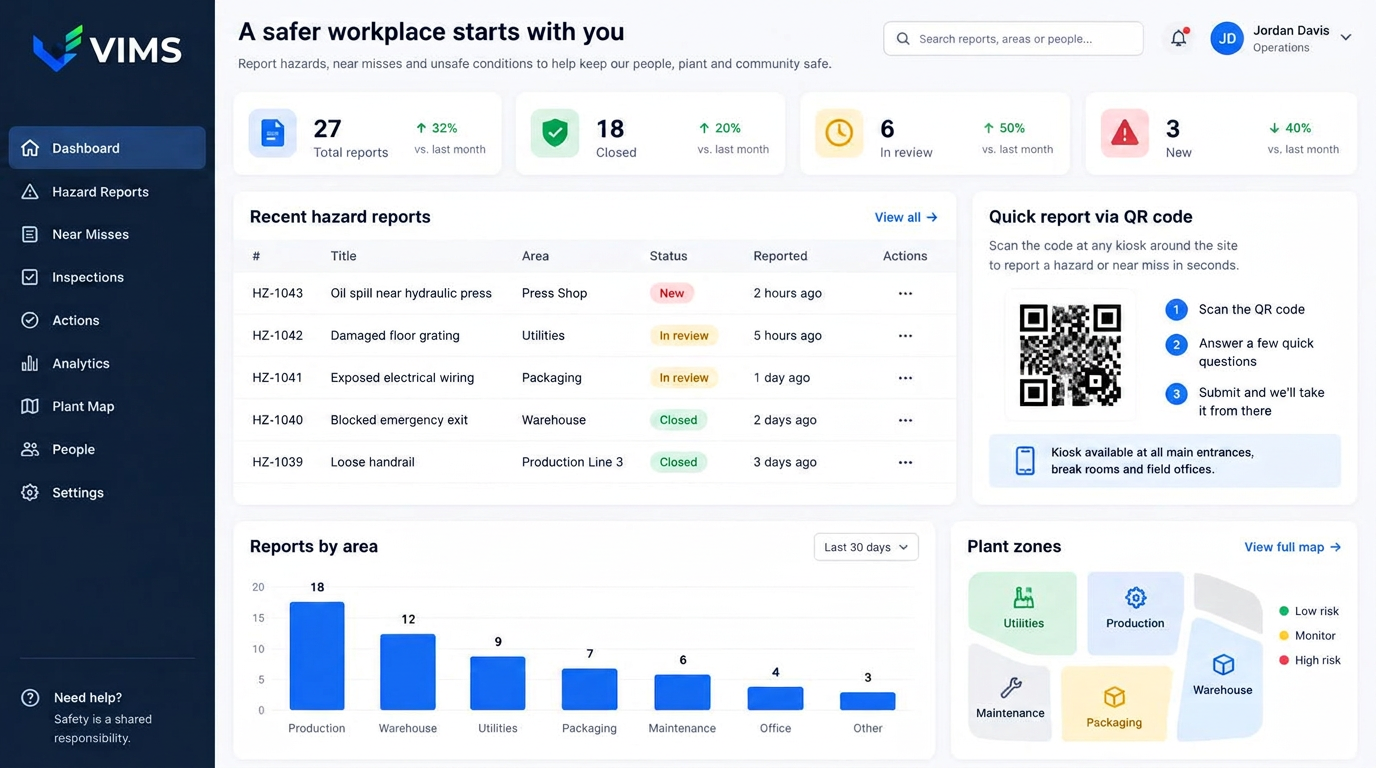
VIMS — hazard and near miss reporting software showing a report list with statuses, QR-code reporting and statistics by plant area

Why the notebook at the supervisor's desk stops working

Almost every plant has some way of reporting hazards: a notebook, a suggestion box, an email address or a word at the shift meeting. They all share one weakness — the reporter never learns what happened next. After a few such experiences people stop reporting, concluding that nobody reads it anyway.

The second problem is fragmentation. Some remarks reach maintenance, some reach safety, some stay in a team leader's notes. Nobody sees the whole picture, so nobody notices that three different people reported the same gate, the same ladder or the same oil leak.

The VIMS reporting module solves both with one mechanism: every report gets a number, an owner and a status visible to the reporter. Information stops being a private note and becomes part of a process that can be counted, followed up and presented at management review.

A report in under a minute, with no account and no computer

A machine operator will not walk to an office computer to describe a protruding grating. So a report in VIMS is created on a phone, a shop-floor tablet or a kiosk at the entrance to an area. A QR code at the line opens the right form with the location already set.

The form is short: what happened, where, a photo and optionally a suggested fix. Classification — category, risk, assignment — is the job of the person handling it, not the reporter. The entry barrier stays low while data quality is built on the safety team's side.

Reports can be named or anonymous. The anonymous channel matters most for issues around behaviour, time pressure or bypassed procedures, where people fear consequences. Either way the case enters the same queue under the same deadlines.

What the Hazard reporting module gives you

QR and kiosk reporting

A code at a line or zone opens the form with the location prefilled — no login, no hunting for the right paper form.

Anonymous and named reports

Two channels in one register, so difficult topics also have somewhere to go.

Triage and classification

Significance, category and the decision: close on the spot, escalate to analysis or create an action.

Feedback to the reporter

Status and comments visible to the person who reported, which is what keeps reporting alive.

Reporting-rate statistics

Report volumes by area, shift and category, plus time to first response.

Escalation into analysis

A serious report can become an event with root cause analysis and corrective actions.

From the shop floor to a closed report

Every report follows the same predictable path, whoever submitted it.

  1. 1Report from phone, kiosk or QR code
  2. 2Receipt acknowledged
  3. 3Triage and owner assigned
  4. 4Resolved or escalated to analysis
  5. 5Feedback to the reporter
  6. 6Closure and area statistics

The measure that actually describes safety culture

Accident counts are a lagging indicator — they describe what already happened. Near miss volume, handling time and the share of reports that led to a change are leading indicators the organisation can influence today.

In VIMS this data comes out of everyday work rather than extra reporting. You can see which area reports regularly and which stays silent — and silence from a high-risk area is usually a warning sign, not proof of safety.

The figures can be shared with teams as feedback: how many reports came from their area, how many led to a change and how quickly. It turns safety conversations from general appeals into specific numbers.

What to do with a report you cannot resolve right away

Some reports need investment: replacing a machine, rebuilding a walkway, new ventilation. Closing them with a note about budget destroys trust in the system. The better route is to accept the report, apply an interim control and keep the case open with a review date.

VIMS lets you run these as long-term actions linked to the risk assessment and the investment plan. The reporter sees the case is live, and the organisation keeps a list of issues that return to management review with a clear justification.

Frequently asked questions about hazard reporting

Does an employee need an account?

No. A report can be submitted from a kiosk or after scanning a QR code without logging in. Accounts are needed by the people who handle and close cases.

What is the difference between a report and a near miss?

A report is any information about an irregularity: equipment condition, work organisation, behaviour. A near miss is a situation that could have caused injury. A report can be reclassified as an event at any time.

Will the reporter find out what happened?

Yes. Status and the handler's comments are visible to the reporter, unless the report was anonymous.

Can duplicate reports of the same problem be controlled?

Reports from the same location are shown together, so the handler can merge them into one case instead of running parallel actions.

Does the module also fit quality and environmental reports?

Yes. Report categories are configurable, so one channel can serve safety, environment, quality and housekeeping.

Related modules

VIMS module

Report an event in seconds, run the root cause analysis, plan actions and close the case with complete documentation in one place.

Accidents and incidents

Root cause analysis

Repeating events usually mean the previous investigation stopped at human error. This module walks the team through structured RCA techniques and makes sure every finding becomes a concrete action.

Root cause analysis

Rounds and inspections

A safety walkaround is a cheap prevention tool, but only when it happens regularly and ends with an assigned task. This module enforces both conditions.

Rounds and inspections

Open a simple channel for reporting hazards

Book a demo and see a QR-code report submitted and handled end to end.