
VariloVIMS

VIMS Intelligence — AI for real EHS/QHSE work

AI assists. People approve. The intelligence layer shortens the most tedious part of working with documents and data, without hiding the source or taking over responsibility for the decision.

  • Human-in-the-loop
  • Visible source
  • To-verify status
  • Human approval
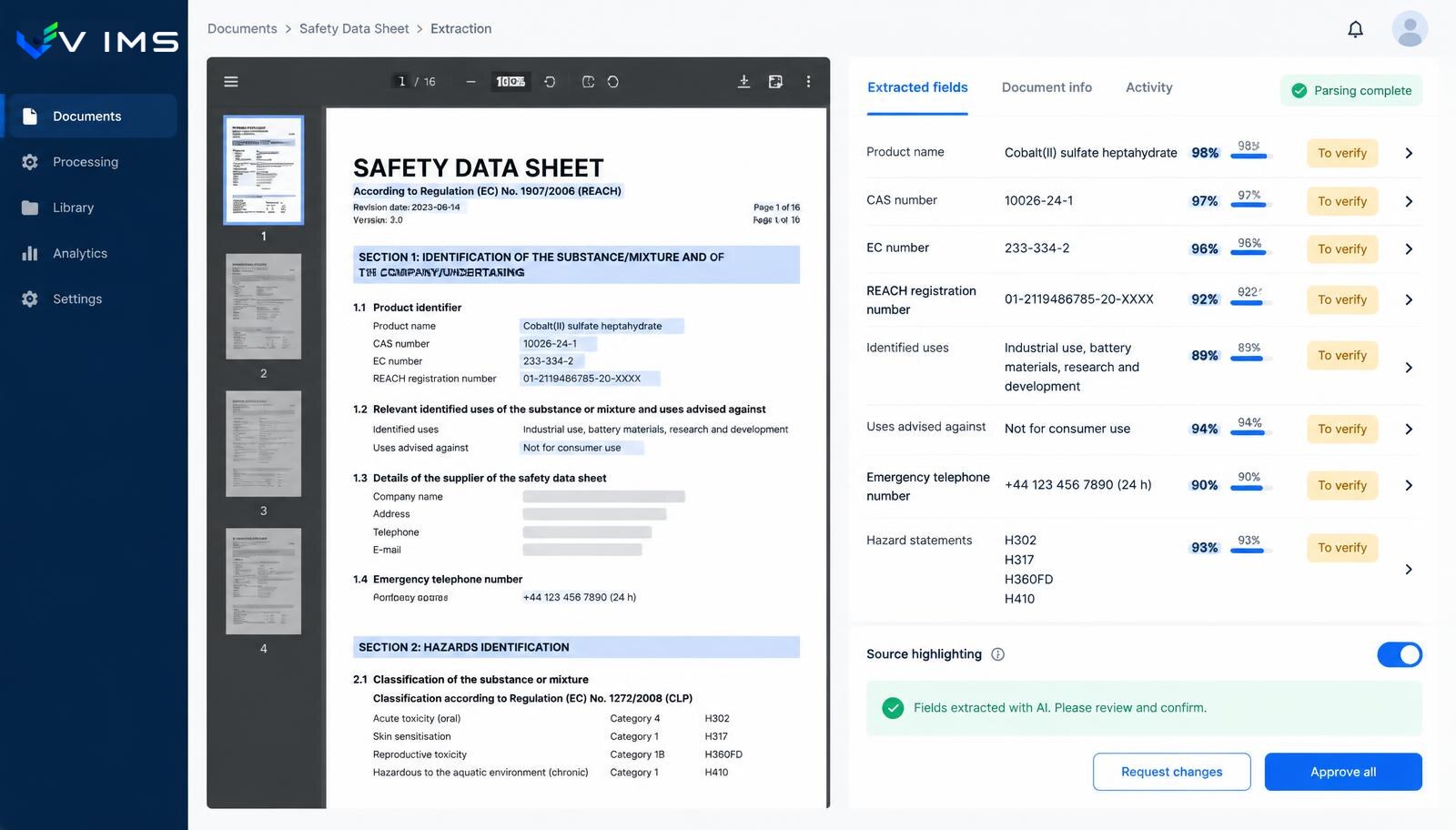
VIMS Intelligence — safety data sheet extraction with recognised fields, to-verify status and user approval

Where AI makes sense in workplace safety

In EHS, artificial intelligence is often sold as a replacement for the expert. That assumption is both wrong and risky. Risk assessment, incident classification and decisions on protective measures require context a model does not have: how work is organised, the plant culture, the history of technical changes and how people actually behave.

The value lies elsewhere — in reproductive work. A safety data sheet has sixteen sections and dozens of fields, most of which must be copied into a register. An incident description written by an operator needs categorising. A document in a foreign language needs summarising. These are tasks where a well-applied model saves hours without making substantive decisions.

So VIMS Intelligence is built around one rule: the model prepares a suggestion, a person verifies and approves it. Every suggestion carries a visible source, a 'to verify' status and a record of who finally accepted it. Without that, automation in safety is merely a transfer of risk.

Safety data sheet extraction as the reference case

The most measurable scenario concerns chemicals. A plant using several hundred substances has several hundred documents from which the same information must be extracted: trade name, CAS and EC numbers, H and P statements, classification, pictograms, recommended protective equipment and storage conditions. Copying this manually takes weeks and produces typos that later travel into workplace instructions.

The intelligence layer can recognise document structure and propose values for register fields. What matters is how the result is presented: next to each recognised value sits the place in the document it came from, plus an unambiguous status awaiting verification. The specialist does not retype — they check and approve.

The same logic governs other scenarios: suggested incident categories, summaries of long descriptions, or proposed links between an action and earlier cases. Always with a visible source and always with the decision left to the user.

How the intelligence layer works

Document extraction

Field recognition in safety data sheets and other technical documents instead of manual retyping.

Human approval

No value enters the register automatically. The user confirms or corrects every suggestion.

Visible source

Each recognised item shows the fragment of the document it came from, together with its context.

'To verify' status

Data awaiting review is clearly marked and never blends into approved register content.

Decision trail

History shows who accepted a suggestion and what they changed, so accountability stays with people.

Scope agreed with the customer

We enable only scenarios confirmed in the customer environment — no promises of unavailable features.

From document to approved record

The same pattern applies to every AI-assisted scenario in VIMS.

  1. 1Loading a document or a description entered by a user
  2. 2Recognising structure and extracting fields
  3. 3Presenting suggestions with the source indicated
  4. 4Marking data with a 'to verify' status
  5. 5Review and correction by a specialist
  6. 6Approval and saving to the register with a decision trail

Modules using this layer

VIMS module

One substance register, current safety data sheets available from a phone and full control over what is used where on site.

Explore the module

Root cause analysis

Repeating events usually mean the previous investigation stopped at human error. This module walks the team through structured RCA techniques and makes sure every finding becomes a concrete action.

Explore the module

VIMS module

No more action lists in a spreadsheet. Every action has an owner, a deadline, a status and an effectiveness check — all in one view.

Explore the module

VIMS module

Run risk assessment online: hazards, risk levels, control measures and reviews in one place, connected to what actually happens on site.

Explore the module

VIMS module

Report an event in seconds, run the root cause analysis, plan actions and close the case with complete documentation in one place.

Explore the module

Why human-in-the-loop is not decoration

In safety documentation an error does not stop at a bad record. A misread hazard statement travels into a workplace instruction, the instruction into training, the training into practice. Unwinding that chain a year later costs far more than checking a suggestion once at data entry.

That is why the intelligence layer has no 'trust and save' mode. Suggestions are visible as suggestions, and the register holds only approved data. From an audit perspective that distinction matters: you can always point to the person who accepted a given value.

There is a practical side too. Specialists are far more willing to use a tool that does not take control away from them. Automation running in the background that 'knows better' loses team trust quickly — and a tool the team distrusts stops being used.

What we do not promise

We do not claim the system will assess occupational risk on its own or classify an event as a workplace accident. Those decisions require knowledge, context and formal responsibility that cannot be handed to a language model.

We also do not promise flawless extraction. Safety data sheets differ in layout, scan quality and language. That is precisely why the interface is built around verification rather than trust — the gain is shorter work, not eliminated work.

The scope enabled for a given customer is always confirmed before rollout. If a scenario is not available in the current version, we say so directly instead of describing it in marketing material.

Questions about VIMS Intelligence

Does AI make decisions in the system?

No. The intelligence layer prepares suggestions and shortens reproductive work, but data is saved only after user approval. Substantive responsibility stays with people.

Which scenario saves the most time?

Usually working with safety data sheets, because it involves many documents of repeatable structure and very tedious copying of the same fields.

What happens if the model reads something wrongly?

The suggestion sits next to its source, so the error can be caught before saving. The user corrects the value manually and the correction is recorded in the history.

Are AI features available in every deployment?

The set of enabled scenarios is agreed individually and confirmed before go-live. We do not present as available anything that cannot be shown in the customer environment.

Will AI replace the safety specialist?

No. It replaces part of the clerical work that requires no expert judgement. Risk assessment, incident classification and decisions on protective measures remain the specialist's job.

How is document confidentiality handled?

Document processing rules, data scope and technical arrangements are discussed before rollout with the customer's IT team, because requirements differ between organisations.

Other platform layers

VIMS Field

Scan. Complete. The data is already in the process. VIMS Field moves selected activities from the desk to the phone so an observation made on the shop floor does not end up as a note in a hi-vis pocket.

See

VIMS analytics

A safety report is useful when it comes from data already in the system, not from a spreadsheet stitched together once a quarter. In VIMS the indicators come straight from operational registers, so you never have to choose between being current and being credible.

See

See safety data sheet extraction on your own document

During a demo we can show the full cycle: the document, the recognised fields, the verification status and the approval step.