
LMRA — the last check before anyone picks up a tool

A job risk assessment describes a workplace under typical conditions. LMRA answers a different question: is this work safe here, right now, with this crew?

  • LMRA
  • Stop work authority
  • Barriers
  • High-risk work
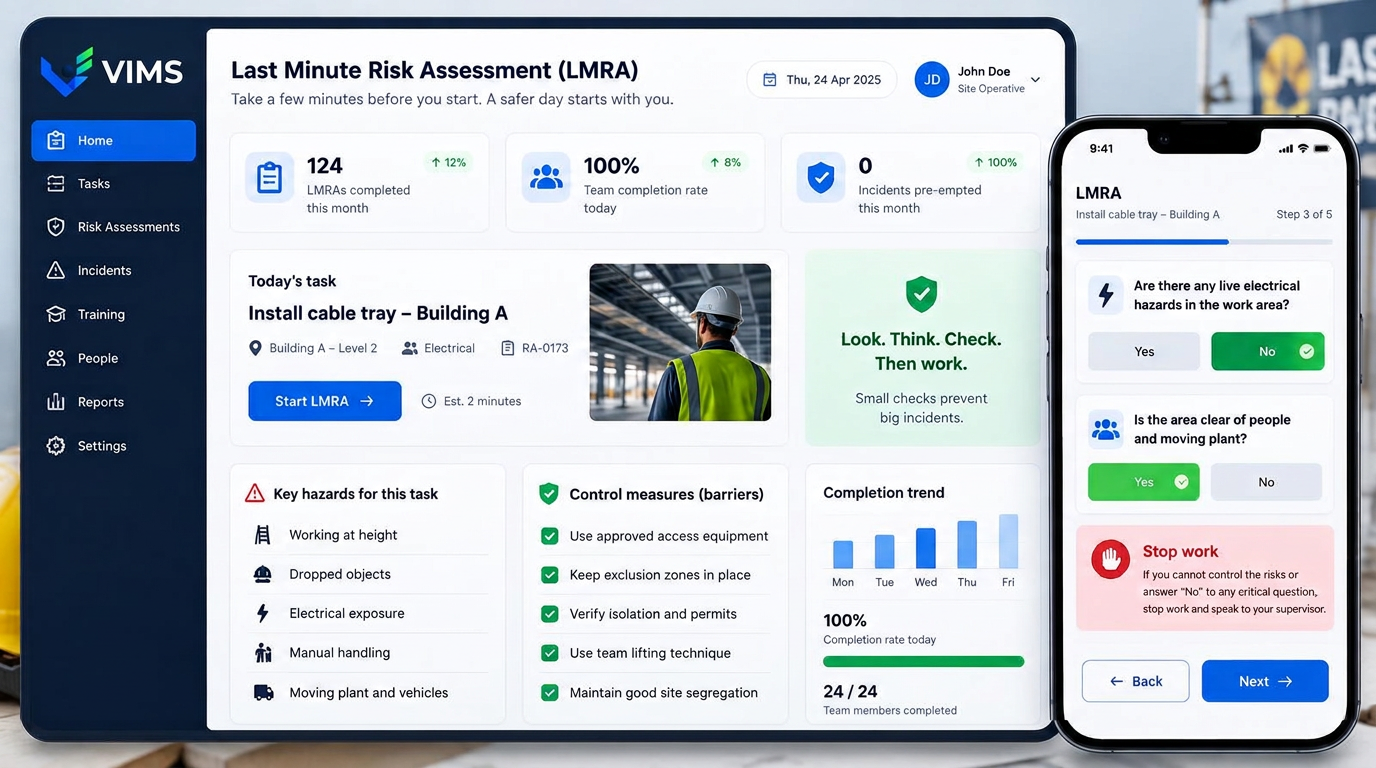
VIMS — LMRA module showing a pre-task risk assessment on a phone, hazards and barriers list and a stop-work card

The gap between the risk assessment document and the real situation on site

A job risk assessment is written once and describes typical conditions: a known workplace, working equipment, a predictable environment. Reality often differs — another repair is running nearby, a guard is missing, the floor is wet, the crew is different and the job is urgent.

Most incidents during non-routine work happen in that gap. The document was correct and the procedure existed, yet conditions at the moment work started were not the ones assessed months earlier in an office.

LMRA (Last Minute Risk Assessment) closes the gap with a short structured check completed by the crew themselves, right before the task. In VIMS it usually takes two minutes on a phone and leaves a record a corridor conversation never does.

A short list of questions that forces a pause

The LMRA form is deliberately short. It covers the surroundings, the condition of tools and protective equipment, other people and vehicles nearby, energy and services, team communication, and whether anyone has doubts. Answers are binary, so it cannot be filled in on the move without reading.

A negative answer to a critical question prevents the LMRA from being completed as positive. The crew must either fix the problem or stop work and call a supervisor. That is the simplest possible implementation of stop-work authority — not a poster slogan, but a step in the app.

Question sets differ by work type: one for work at height, another for electrical work, another for internal transport. That keeps LMRA short instead of turning it into yet another universal form people click through.

What the LMRA module gives you

Short question sets

Separate lists for work at height, electrical work, transport or confined spaces.

Barrier verification

Confirmation that required guards, protective equipment and exclusion zones are in place and working.

Stop work

A negative answer on a critical question blocks the start and routes the case to a supervisor.

Start from a code on site

Scanning a zone code opens the right question set with the location attached.

A record of every check

Date, time, people, answers and remarks stay in the system as evidence the check took place.

A view of difficult places

Where and on which tasks negative answers appear most often.

Two minutes before the task begins

LMRA is a short ritual that ends with a clear decision: start, or stop the work.

  1. 1Scan a code or pick the task
  2. 2Answer questions about conditions
  3. 3Verify barriers and protective measures
  4. 4Decide: start or stop
  5. 5Report the problem if there is one
  6. 6Assessment saved with the task

LMRA and permits to work are two different tools

A permit to work is formal authorisation issued before high-risk work, involving several people and usually prepared in advance. LMRA is done by the working crew at the last moment, already on site, and does not replace the permit.

In practice they complement each other: the permit sets the conditions and LMRA verifies those conditions actually hold at the start. In VIMS an LMRA can be linked to a specific permit, so supervision sees both together.

The same applies to the job risk assessment. If LMRA repeatedly reveals a hazard that is absent from the workplace assessment, that is a signal to update the document rather than repeat the same remark on every task.

How to deploy LMRA so it does not become box-ticking

Routine is the biggest risk to LMRA. If the form is long, repetitive and never leads to a decision, people will complete it automatically. Six relevant questions for a given work type beat twenty generic ones.

The second condition is how the organisation reacts. If someone stops work and meets irritation from a supervisor, every future LMRA will be positive. Statistics on negative answers help here: no stoppages at all in a quarter rarely means everything was perfect.

Frequently asked questions about LMRA

Does LMRA replace the job risk assessment?

No. The job risk assessment is a document describing the workplace, while LMRA checks conditions here and now. They work at different levels and complement each other.

How long does an LMRA take?

With a well-chosen question set, usually around two minutes. If it takes much longer, the list is too long and should be trimmed.

What happens after a stop-work decision?

The task cannot start and the supervisor is notified. Once the problem is resolved the crew completes the LMRA again.

Can a contractor complete an LMRA?

Yes. The question set is made available to contractors and the assessment is linked to their task and permit to work.

Can LMRA records be shown during an inspection?

Yes. Every assessment carries the date, time, people and answers, so it is documented evidence of a pre-task check.

Related modules

VIMS module

Run risk assessment online: hazards, risk levels, control measures and reviews in one place, connected to what actually happens on site.

Risk assessment

Permit to work

No more paper permits travelling around the site in search of a signature. The application, task risk assessment, approvals and working conditions run in one workflow visible to everyone involved.

Permit to work

Hazard reporting

The cheapest information in a plant is the one that arrives before an accident. This module shortens the path from spotting a hazard to deciding on an action, and makes sure the reporter hears back.

Hazard reporting

Try LMRA on your own tasks

Book a demo and see the two-minute pre-task check and how it is recorded.