
VIMSVIMS

Smart data import and AI assistant — stop retyping your documents

The most expensive part of rolling out a safety system is not the licence; it is the weeks spent retyping employee records, medical checks, qualifications and safety data sheets. This module shortens that stage and makes sure nothing enters a register without human approval.

  • Human approval
  • Visible source
  • To-verify status
  • Can be switched off
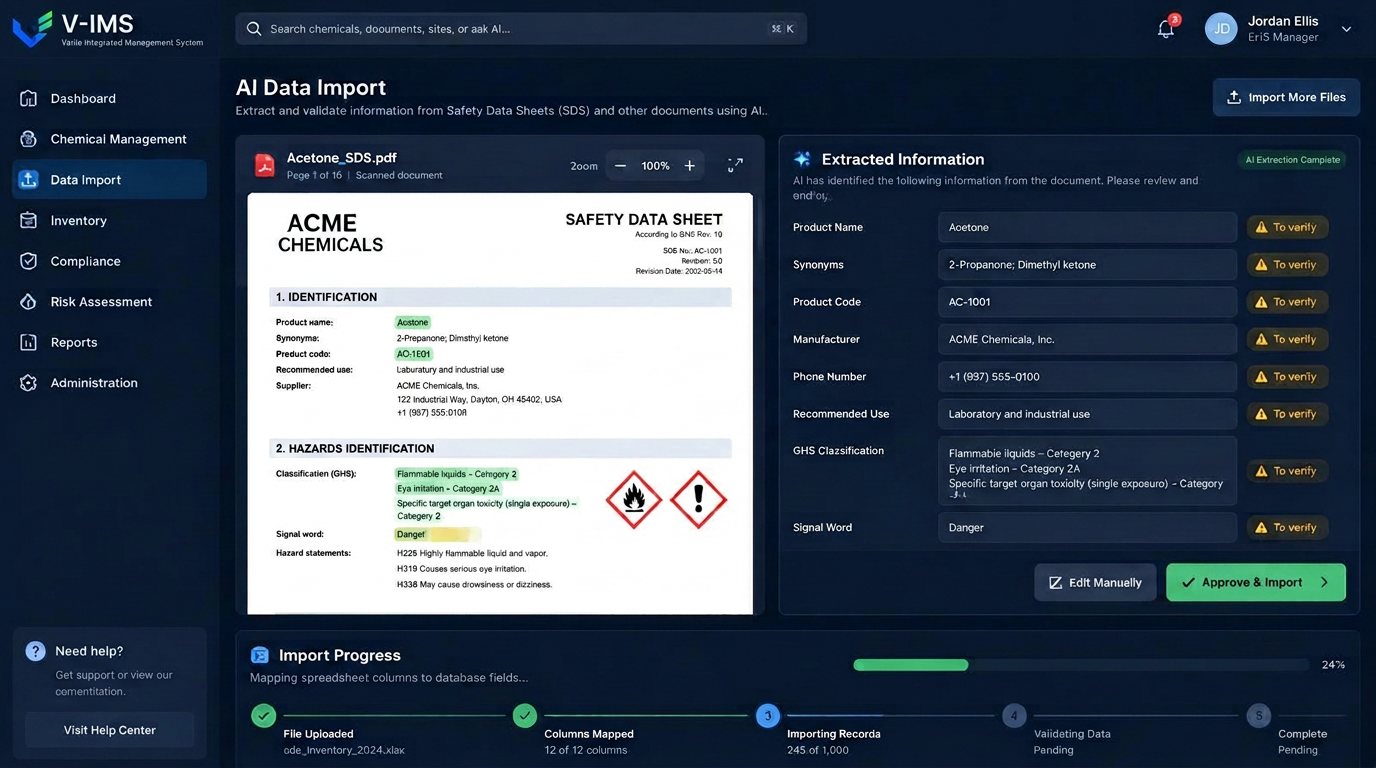
VIMS smart data import — safety data sheet extraction with recognised fields, to-verify status and a user approval button

Why EHS rollouts stall on data

The purchase decision is usually quick. Then comes the stage nobody budgeted for: entering several hundred employees, their jobs, medical checks, training and qualifications, dozens of chemicals with their safety data sheets, an equipment register and inspection dates. It all exists — in spreadsheets with inconsistent structures, in PDFs and on paper.

In practice this stage decides whether the whole project succeeds. If retyping takes three months, the system only starts being used once the team's enthusiasm has faded and part of the data has already gone out of date.

The smart import module handles exactly that stage. It accepts files in the shape the organisation already has them, recognises the column structure and proposes how to map it onto system fields. People do not retype; they check and approve.

Safety data sheets — the most tedious part of chemical management

A safety data sheet has sixteen sections and dozens of details, many of which must reach the substance register: trade name, manufacturer, CLP classification, H and P statements, pictograms, hazardous components, protective equipment and emergency procedures. With fifty substances that is a dozen or more hours of typing, and every sheet revision brings the work back.

The assistant reads the document and fills the form with proposals. Every value shows where it came from and carries a to-verify status; the specialist compares it with the source document and either accepts or corrects it. Nothing reaches the register automatically.

The practical effect is that working with sheets stops being transcription and becomes review. Entering one substance drops from a dozen minutes to a few, and record quality rises because attention goes to verification rather than copying characters.

What the smart import module gives you

Safety data sheet reading

Fields recognised from an SDS and used to fill the form with proposals that point back to the source.

Excel and CSV import

Column structure recognised and mapped to system fields, without reshaping the file first.

To-verify status

Every proposal is clearly marked and waits for approval — nothing enters the register automatically.

Data quality checks

Duplicates, gaps and values that do not match the expected format are flagged before saving.

Approval trail

History shows who accepted a given value and when — useful during an audit.

Control over the feature

The assistant can be switched off in organisation settings, and client data is not used to train public models.

From document to approved record

Every item follows the same path — no shortcuts and no saving that bypasses a person.

  1. 1File uploaded
  2. 2Reading and recognition
  3. 3Proposals with source
  4. 4Specialist verification
  5. 5Approval
  6. 6Saved to the register

The governing rule: a proposal is not yet data

Artificial intelligence in safety documentation needs a clearly limited role, because a wrong substance classification or a misassigned qualification has real consequences. VIMS therefore applies one rule without exceptions: the model proposes, a person approves.

Proposals are clearly separated from approved data — they carry their own status and remain visibly unverified until accepted. The record history shows who approved a given value and when, which matters during a later audit or inspection.

The model makes no substantive decisions. It does not assess risk, classify an event as an accident or decide on protective measures. It handles reproductive work: reading, structuring and proposing where each value belongs.

Excel import without tidying files first

Employee records rarely have a tidy structure. Columns are named differently in different departments, dates appear in three formats, and certificate numbers sit in the same cell as the course name. Classic imports demand that the file be reshaped into a template first — often a day's work in itself.

The assistant recognises column content and proposes a mapping onto system fields, flagging doubtful rows along the way: missing dates, duplicate people, values that do not match the expected format. The person running the import sees a summary before saving and decides what to bring in.

The same mechanism serves later updates — for example a regular upload of completed training or periodic medical checks from an occupational health provider's file.

Company data and confidentiality

AI features work on documents that describe the organisation and sometimes contain personal data. The scope is therefore limited: personal data is filtered before processing, and client content is not used to train public models.

The organisation keeps control of the feature itself. The assistant can be switched off in organisation settings, leaving classic import and manual entry. A mode using the customer's own model provider key is also available where company policy requires it.

These rules are described in the terms of service and the data processing agreement, so legal and the data protection officer can review them before the feature is enabled rather than afterwards.

Frequently asked questions about the AI assistant and data import

Does the AI write data into the system by itself?

No. The assistant prepares proposals with a to-verify status. Data is saved only after a user accepts it, and the history records who did so.

Are our documents used to train models?

No. Client content is not used to train public models, and personal data is filtered before processing. The rules are set out in the terms of service and the data processing agreement.

Can we work without the AI features?

Yes. The assistant can be switched off in organisation settings. File import and manual entry work independently of it.

Do Excel files have to be tidied up first?

Not as a condition. The assistant recognises the column structure and proposes a mapping, flagging doubtful rows for review before saving.

What about safety data sheets in other languages?

The document is read and summarised, and recognised values arrive in the form as proposals. The specialist verifies them exactly as with a local-language document.

Is the module in every plan?

The AI assistant is included from the Professional plan upwards, and with a base licence it can be added as a single module. Task limits and details are in the pricing section.

Related modules

VIMS module

One substance register, current safety data sheets available from a phone and full control over what is used where on site.

Chemicals and SDS

Employees and competence

The same people appear on the training list, in the examination schedule, in a risk assessment, on a work permit and in an accident report. If each of those lists lives its own life, sooner or later they stop agreeing. This module fixes the problem at the data level, not at the form level.

Employees and competence

VIMS module

See in one view who holds valid training and qualifications, whose certificates expire soon and what is missing for a given job.

Training and qualifications

Cut weeks of retyping out of your rollout

Book a demo and watch one of your own safety data sheets and one of your own record files go through the import.