
VIMSVIMS

Lone worker protection — for people who work alone and in the field

A technician at a client site, a maintenance worker on the night shift, a driver on the road, an inspector inside a tank. If something goes wrong, there is nobody to call for help. This module shortens the time before someone finds out.

  • Working alone
  • High-risk work
  • Alarm procedure
  • Beta
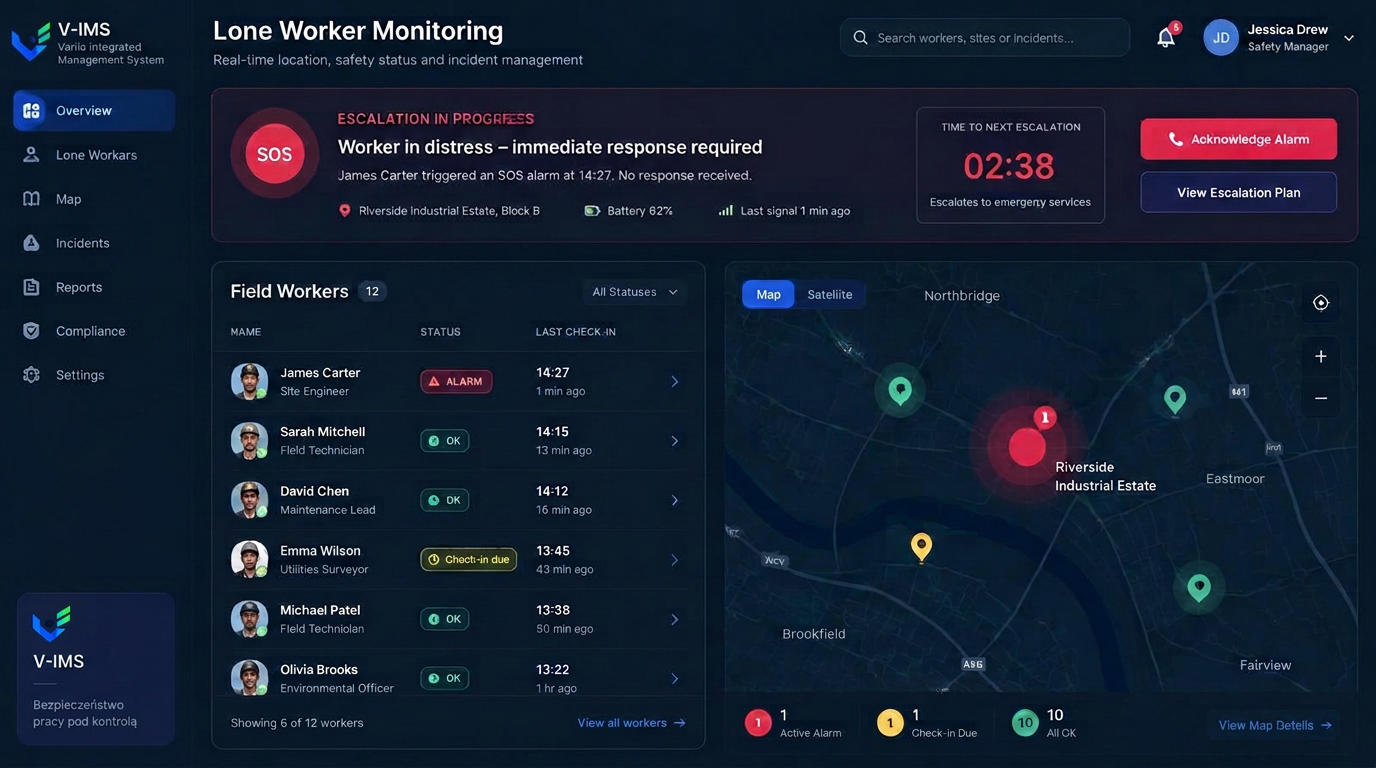
VIMS lone worker module — dispatcher console with field worker statuses, check-in times, a location map and an active SOS alarm

The real problem: nobody knows anything happened

Analyses of lone working incidents keep showing the same pattern. The event itself is often not the worst part — the time that passed before anyone learned about it is. Someone loses consciousness, falls, suffers heat stress or gets trapped. The phone is a metre away and the nearest colleague is kilometres off, expecting contact only in the afternoon.

The usual organisational answer is an instruction: call when you are done. It works while everything goes to plan. It fails in precisely the situation it was invented for, because a person who needs help is usually unable to ask for it.

This module inverts that logic. It is not the worker who must signal that something happened; the system reacts to the absence of a signal that everything is fine. The app runs in the background on the worker's phone, responds to a fall and to prolonged immobility, and lets the worker raise an alarm with one button.

Who this really matters to

Lone working is not limited to extreme cases. It covers service engineers visiting clients, maintenance crews on second and third shifts, water and wastewater staff, cold-store operatives, facility inspectors, security staff, drivers, technicians across dispersed sites and EHS consultants visiting client plants.

Labour law does not publish one universal list of tasks that may never be done alone, but it does require employers to organise work and provide supervision for tasks that pose particular danger. The module does not replace a second person where regulations demand one. It supports organisation wherever working alone is permitted but still carries elevated risk.

For the employer, another point matters: the procedure becomes documented. Every alarm, acknowledgement and response is stored with a date and time — evidence that protection existed in practice, not only on paper.

What the lone worker module gives you

Fall and no-motion detection

The app reacts to a sharp fall and to a lack of movement for a set period, with a window to cancel a false alarm.

SOS alarm button

A deliberate call for help with one button, without having to explain the location or the situation.

Location at the moment of the alarm

Coordinates captured at alarms and check-ins, not continuous tracking of the worker's route.

Dispatcher notifications

Alarms reach the named responders, with escalation if the first person does not acknowledge.

Alarm and response history

A register of events with signal and acknowledgement times — evidence that the procedure really works.

Linked to the incident register

A confirmed alarm can become an event in the incident register, with root cause analysis and actions.

From signal to a closed event

The module does not stop at a notification. The event continues along the same path as any other event in VIMS.

  1. 1Signal or missed check-in
  2. 2Warning on the phone
  3. 3Alarm to the dispatcher
  4. 4Response acknowledged
  5. 5Event recorded
  6. 6Actions and conclusions

How detection works

The mobile app runs in the background and uses the phone's motion sensors. A sharp fall or a lack of movement for a defined period first triggers a short warning period — the phone signals the situation and the worker can cancel a false alarm with one tap. Only a lack of response escalates the alarm further.

The second path is a deliberate alarm: the SOS button, used when the worker judges the situation to be dangerous. There is no need to explain where they are or what is happening; the person and location are sent automatically.

The third path is a scheduled check-in. The worker confirms at agreed intervals that everything is fine. A missing confirmation is treated as an alarm signal, which matters for events without a sudden fall — poisoning, fainting or entrapment.

Location only when it is needed

The most common resistance to this kind of tool is not technical but about feeling tracked. The module is therefore designed so location serves rescue rather than supervision: it is captured at the alarm and at check-ins, not maintained as a continuous trace of the working day.

That design also makes the conversation with the workforce and employee representatives easier. The purpose is unambiguous: shorten the time it takes for help to arrive. The scope of processing is described in the implementation documentation and the data processing agreement, and the organisation decides who may see the dispatcher view.

Settle this before go-live. Rollouts where people understand the rules end with the app actually being used. Rollouts introduced without that conversation end with phones switched off.

The alarm procedure is the real implementation

The app alone rescues nobody. What rescues is the procedure the app triggers. Four questions need answers before go-live: who receives the alarm, within what time they must react, what they do if the worker cannot be reached, and who takes over when the first responder is unavailable.

VIMS lets you assign notification recipients and keeps a register of alarms together with the response. After each event you can see how much time passed between the signal and the confirmed reaction — the only measure that says anything real about how well the protection works.

An event confirmed as genuine can be moved into the accident and incident register, and its conclusions into corrective actions and an update of the risk assessment for that type of work.

Frequently asked questions about lone worker protection

Does the module replace supervision required by law?

No. Where regulations require a second person or continuous supervision, the module is only a supplement. It supports work organisation and shortens response time, but it does not remove the employer's legal duties.

Is the worker tracked all day?

No. Location is captured at the moment of an alarm and at check-ins. The module is not designed as a time-tracking or route-recording tool.

What happens with a false alarm?

After a fall or no-motion is detected the phone first warns the worker. Cancelling takes one tap and the alarm is not escalated.

Are special devices required?

No. The module runs on the worker's phone and is billed by the number of protected devices.

What about areas with no coverage?

Without connectivity no tool of this class can deliver an alarm. For work in such places the procedure must define an additional contact method agreed before the work starts.

Does it work without a full VIMS rollout?

Yes. Lone worker protection can run as a standalone service as well as an add-on to any plan. Billing details are in the pricing section.

Related modules

VIMS module

Report an event in seconds, run the root cause analysis, plan actions and close the case with complete documentation in one place.

Accidents and incidents

Permit to work

No more paper permits travelling around the site in search of a signature. The application, task risk assessment, approvals and working conditions run in one workflow visible to everyone involved.

Permit to work

LMRA

A job risk assessment describes a workplace under typical conditions. LMRA answers a different question: is this work safe here, right now, with this crew?

LMRA

See lone worker protection against your own tasks

Book a demo — we will walk an alarm from fall detection through to the dispatcher's confirmed response.